In one of recent discussions with Mr. X I was asked about my approach to solving the Linux cookie problem
A random quote Repository will be a text file Each quote will be segregated by a '%' Can be multiline. I always believe in incremental steps so here is what I could think of
journald is used to query the systemd journal contents.
Example 1 # Lets try and see the kubelet service logs in the systemd journal
The performance I was getting after deploying Elasticsearch 7.6.2 and Kibana in my local VM’s was not satisfactory, so I thought of deploying a front proxy Nginx in front and enabling static resources caching.
Timeseries is a data stream that is defined for a set of fields over a time period. Some examples may include, daily attendance register for an organization, wherein people punching in every-morning will be different, missing mostly for weekends or on planned and unplanned leaves.
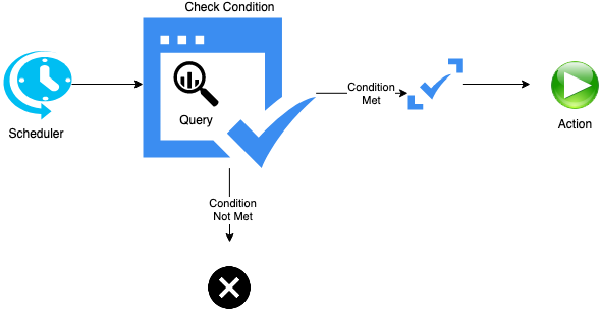
Watcher # Watcher is an Elasticsearch feature that facilitates alerting and can be used to create actions based on conditions, which are periodically evaluated using queries on your data. There are two ways of creating a watcher
Aggregation works on a group of documents and can be categorized
Metric Pipeline Bucket Matrix Metric Aggregation # Computes a single or multiple values
Text is a key data in most of the information that is ingested in the elasticsearch, and whether it is type text or keyword it requires careful consideration to choose which analyzer to use.
Painless is a simple, secure scripting language designed specifically for use with Elasticsearch.
The official guide is available here.
Pipelines is a smooth way of processing some incoming data. In this blog, I will walk through some of the items I have tried my hands on.
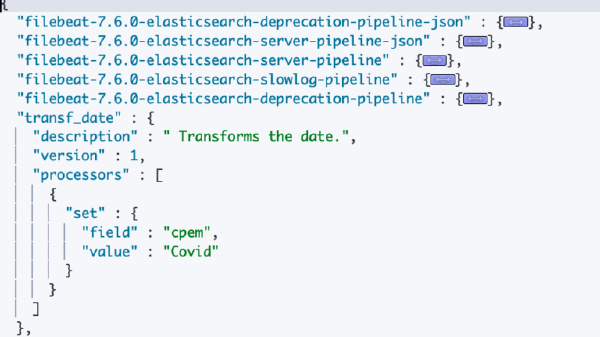
Pipeline # A pipeline is a definition of a series of processors that are to be executed in the same order as they are declared.
_reindex # Official documentation here.
This API is meant for copying data from one index to another. It is especially useful when you are copying data from one index to another.
What is intriguing about elastic stack is that; it can do so many things that it simplifies the life of a security analyst. The uphill task is to learn the technology itself, but once you have mastered it, things are much easier.
I will extrapolating based on the original documentation available here and based on some of my experience using this API.
It copies documents from one index to another.
Extracts the document source from the source index and indexes the documents into the destination index. You can copy all documents to the destination index, or reindex a subset of the documents.
Open specification for document fields for data ingested in Elasticsearch. It brings uniformity to certain common fields that are used across data sources.
ECS defines two field levels
Core fields: Represent the fields that are most common across all use cases. Extended fields: That are not part of the core and specific to cases. Field sets # Field sets are multiple groups of related fields defined by ECS. More information here.
If you are not aware of mapping, it might be a little confusing but I would try my best.
Every document that gets indexed in elastic has fields, every field that is accessible has an associated type with it (Inverted Index) which helps elastic organize data for quick retrieval.
If you have a production grade elastic cluster it is always recommended to do a regular backup as a standard practice.
Snapshot is a backup of information, that can be be used to restore the last known good state of the system
In the previous blog we searched for a match\all, and sorted it by age. In this we will improve upon the query we are writing and look for other options.
What I have been doing is evaluating Elasticsearch. The indexing, searching (Phrase, Similarity, Structured, Full Text, Complex), clustering etc. In this blog I will just try and simplify the learning curve.
As a software professional, I have been working in the space of IAM, SSO, DRM for quite some time and from my experience I can say, the way Elastic has simplified the integration of external or internal security for access is a treat for fellow developers. It was interesting to experiment with the security settings, and control tenancy.
Elastic Stack Monitoring Service is available with XPack only.
GET _cluster/settings
{
“persistent” : {
“xpack” : {
“monitoring” : {
“elasticsearch” : {
“collection” : {
“enabled” : “false”
}
},
“collection” : {
“enabled” : “true”
}
}
}
},
“transient” : { }
}