Elastic: Realms
In this blog we will try to setup a realm for elastic authentication.
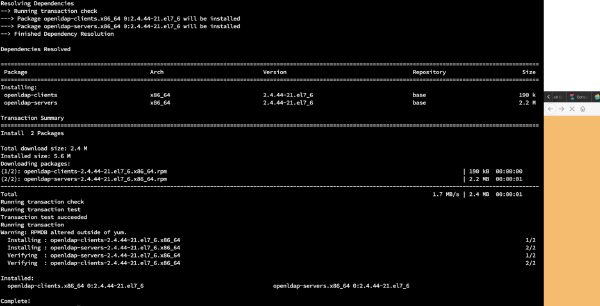
yum -y install openldap-clients openldap-servers
mymachine>systemctl start slapd mymachine>systemctl enable slapd Created symlink from /etc/systemd/system/multi-user.target.wants/slapd.service to /usr/lib/systemd/system/slapd.service. mymachine>slappasswd New password: Re-enter new password: {SSHA}R5nPS+zItZsQrfsw+PIQSNnEiMpLcwLs mymachine>vi /etc/openldap/slapd.d/cn=config/olcDatabase={2}hdb.ldif # AUTO-GENERATED FILE - DO NOT EDIT!! Use ldapmodify. # CRC32 975a66fa dn: olcDatabase={2}hdb objectClass: olcDatabaseConfig objectClass: olcHdbConfig olcDatabase: {2}hdb olcDbDirectory: /var/lib/ldap olcSuffix: dc=my-domain,dc=com olcRootDN: cn=Manager,dc=my-domain,dc=com olcDbIndex: objectClass eq,pres olcDbIndex: ou,cn,mail,surname,givenname eq,pres,sub structuralObjectClass: olcHdbConfig entryUUID: 64a2a5de-3438-103a-8e85-c1c4cc3ef35f creatorsName: cn=config createTimestamp: 20200527073533Z entryCSN: 20200527073533.541185Z#000000#000#000000 modifiersName: cn=config modifyTimestamp: 20200527073533Z mymachine>firewall-cmd --add-service=ldap success mymachine>vi ldaproot.ldif dn: olcDatabase={0}config,cn=config changetype: modify add: olcRootPW olcRootPW: {SSHA}R5nPS+zItZsQrfsw+PIQSNnEiMpLcwLs mymachine>ldapadd -Y EXTERNAL -H ldapi:/// -f ldaproot.ldif SASL/EXTERNAL authentication started SASL username: gidNumber=0+uidNumber=0,cn=peercred,cn=external,cn=auth SASL SSF: 0 modifying entry "olcDatabase={0}config,cn=config" mymachine>cp /usr/share/openldap-servers/DB_CONFIG.example /var/lib/ldap/DB_CONFIG mymachine>chown -R ldap:ldap /var/lib/ldap/DB_CONFIG mymachine>systemctl restart slapd mymachine>ldapadd -Y EXTERNAL -H ldapi:/// -f /etc/openldap/schema/cosine.ldif SASL/EXTERNAL authentication started SASL username: gidNumber=0+uidNumber=0,cn=peercred,cn=external,cn=auth SASL SSF: 0 adding new entry "cn=cosine,cn=schema,cn=config" mymachine>ldapadd -Y EXTERNAL -H ldapi:/// -f /etc/openldap/schema/nis.ldif SASL/EXTERNAL authentication started SASL username: gidNumber=0+uidNumber=0,cn=peercred,cn=external,cn=auth SASL SSF: 0 adding new entry "cn=nis,cn=schema,cn=config" mymachine>ldapadd -Y EXTERNAL -H ldapi:/// -f /etc/openldap/schema/inetorgperson.ldif SASL/EXTERNAL authentication started SASL username: gidNumber=0+uidNumber=0,cn=peercred,cn=external,cn=auth SASL SSF: 0 adding new entry "cn=inetorgperson,cn=schema,cn=config" vi ldapdomain.ldif dn: olcDatabase={1}monitor,cn=config changetype: modify replace: olcAccess olcAccess: {0}to * by dn.base="gidNumber=0+uidNumber=0,cn=peercred,cn=external,cn=auth" read by dn.base="cn=Manager,dc=samarthya,dc=com" read by * none dn: olcDatabase={2}hdb,cn=config changetype: modify replace: olcSuffix olcSuffix: dc=samarthya,dc=com dn: olcDatabase={2}hdb,cn=config changetype: modify replace: olcRootDN olcRootDN: cn=Manager,dc=samarthya,dc=com dn: olcDatabase={2}hdb,cn=config changetype: modify add: olcRootPW olcRootPW: {SSHA}R5nPS+zItZsQrfsw+PIQSNnEiMpLcwLs dn: olcDatabase={2}hdb,cn=config changetype: modify add: olcAccess olcAccess: {0}to attrs=userPassword,shadowLastChange by dn="cn=Manager,dc=samarthya,dc=com" write by anonymous auth by self write by * none olcAccess: {1}to dn.base="" by * read olcAccess: {2}to * by dn="cn=Manager,dc=samarthya,dc=com" write by * read mymachine>ldapmodify -Y EXTERNAL -H ldapi:/// -f ldapdomain.ldif SASL/EXTERNAL authentication started SASL username: gidNumber=0+uidNumber=0,cn=peercred,cn=external,cn=auth SASL SSF: 0 modifying entry "olcDatabase={1}monitor,cn=config" modifying entry "olcDatabase={2}hdb,cn=config" modifying entry "olcDatabase={2}hdb,cn=config" modifying entry "olcDatabase={2}hdb,cn=config" modifying entry "olcDatabase={2}hdb,cn=config" mymachine>vi baseldapdomain.ldif dn: dc=samarthya,dc=com objectClass: top objectClass: dcObject objectclass: organization o: samarthya com dc: samarthya dn: cn=Manager,dc=samarthya,dc=com objectClass: organizationalRole cn: Manager description: Directory Manager dn: ou=People,dc=samarthya,dc=com objectClass: organizationalUnit ou: People dn: ou=Group,dc=samarthya,dc=com objectClass: organizationalUnit ou: Group mymachine>ldapadd -x -D cn=Manager,dc=samarthya,dc=com -W -f baseldapdomain.ldif Enter LDAP Password: adding new entry "dc=samarthya,dc=com" adding new entry "cn=Manager,dc=samarthya,dc=com" adding new entry "ou=People,dc=samarthya,dc=com" adding new entry "ou=Group,dc=samarthya,dc=com" dn: cn=Manager,ou=Group,dc=samarthya,dc=com objectClass: top objectClass: posixGroup gidNumber: 1009 ldapadd -x -W -D "cn=Manager,dc=samarthya,dc=com" -f ldapgroup.ldif Enter LDAP Password: adding new entry "cn=Manager,ou=Group,dc=samarthya,dc=com" mymachine>useradd samarthya mymachine>passwd samarthya Changing password for user samarthya. mymachine>ldapadd -x -D cn=Manager,dc=samarthya,dc=com -W -f ldauser.ldif Enter LDAP Password: adding new entry "uid=samarthya,ou=People,dc=samarthya,dc=com" dn: uid=samarthya,ou=People,dc=samarthya,dc=com objectClass: top objectClass: account objectClass: posixAccount objectClass: shadowAccount cn: samarthya uid: samarthya uidNumber: 1005 gidNumber: 1005 homeDirectory: /home/samarthya userPassword: {SSHA}R5nPS+zItZsQrfsw+PIQSNnEiMpLcwLs loginShell: /bin/bash gecos: samarthya shadowLastChange: 0 shadowMax: 0 shadowWarning: 0 Installing phpLdap # yum install php-ldap php-mbstring php-pear php-xml https://www.digitalocean.com/community/tutorials/how-to-install-linux-nginx-mysql-php-lemp-stack-on-centos-7