Ansible and Molecule are popular tools for configuration management and testing in the world of DevOps. To avoid conflicts between different projects and their dependencies, it is recommended to use a virtual environment for each project. In this blog post, we’ll show you how to set up and use a virtual environment using Python’s built-in venv module on macOS and CentOS 7.
Pre-requisites#
Before we begin, you’ll need the following:
- Python 3 installed on your system
pipinstalled on your system- Basic knowledge of the command line interface
On Centos7#
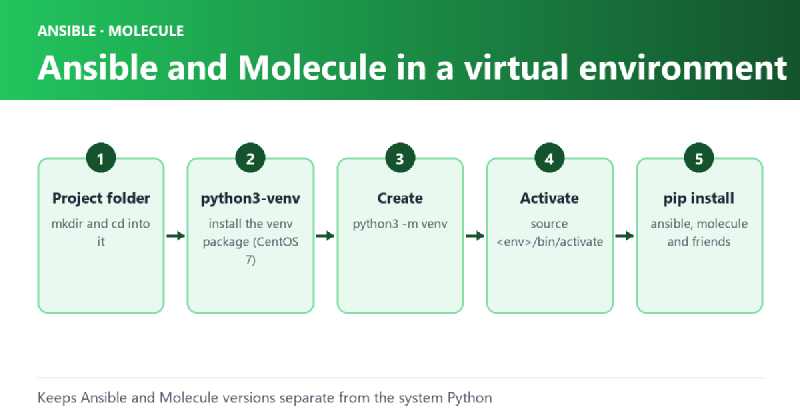
- Open a terminal window and create a directory for your project:
mkdir my-ansible-projectcd my-ansible-project
- Install the
python3-venvpackage:sudo yum install python3-venv
- Create a new virtual environment:
python3 -m venv venv- This will create a new directory named
venvin your project directory, which contains the virtual environment.
- This will create a new directory named
- Activate the virtual environment:
source venv/bin/activate
- Install Ansible and Molecule:
pip install ansible molecule
- Verify that Ansible and Molecule are installed:
ansible --versionmolecule --version- This should display the version of Ansible and Molecule installed in the virtual environment.
- When you’re done working with Ansible and Molecule, you can deactivate the virtual environment:
deactivate
On OSX#
- Open a terminal window and create a directory for your project:
mkdir my-ansible-projectcd my-ansible-project
- Create a new virtual environment:
python3 -m venv venv- This will create a new directory named
venvin your project directory, which contains the virtual environment.
- This will create a new directory named
- Activate the virtual environment:
source venv/bin/activate
- Install Ansible and Molecule:
pip install ansible molecule
- Verify that Ansible and Molecule are installed:
ansible --versionmolecule --version- This should display the version of Ansible and Molecule installed in the virtual environment.
- When you’re done working with Ansible and Molecule, you can deactivate the virtual environment:
deactivate
Using the Virtual Environment#
To use Ansible and Molecule inside the virtual environment, you need to activate the environment first.
This is done with the source command:
source venv/bin/activateOnce the virtual environment is activated, you can use Ansible and Molecule as you normally would. When you’re done, you can deactivate the virtual environment with the deactivate command:
deactivateConclusion#
In this blog post, we showed you how to set up and use a virtual environment using Python’s built-in venv module on macOS and CentOS 7 for Ansible and Molecule. Using a virtual environment helps keep your projects isolated and avoids conflicts between different dependencies.