The last piece of the generated dupfind app is dupfind serve: a small web page that shows the duplicate report
with checkboxes, so you can tick the copies to remove and save a plan.json. The cleaner from
part 3 then applies the plan. The specification
was short and specific:
- use the standard library’s
http.server, bound to 127.0.0.1 only - the page never deletes anything itself
- a button saves
plan.json - reject requests whose Host header is not localhost
What it got right#
Two of the four rules hold. The server is started with:
with socketserver.TCPServer(("127.0.0.1", port), handler) as httpd:so nothing else on the network can reach it. And as part 1
showed, nothing in web.py calls the cleaner, so the page really cannot delete files.
The probes#
I started the server in a temporary folder that also held a file called secret.txt, then sent requests with
Python’s http.client, setting the Host header by hand:
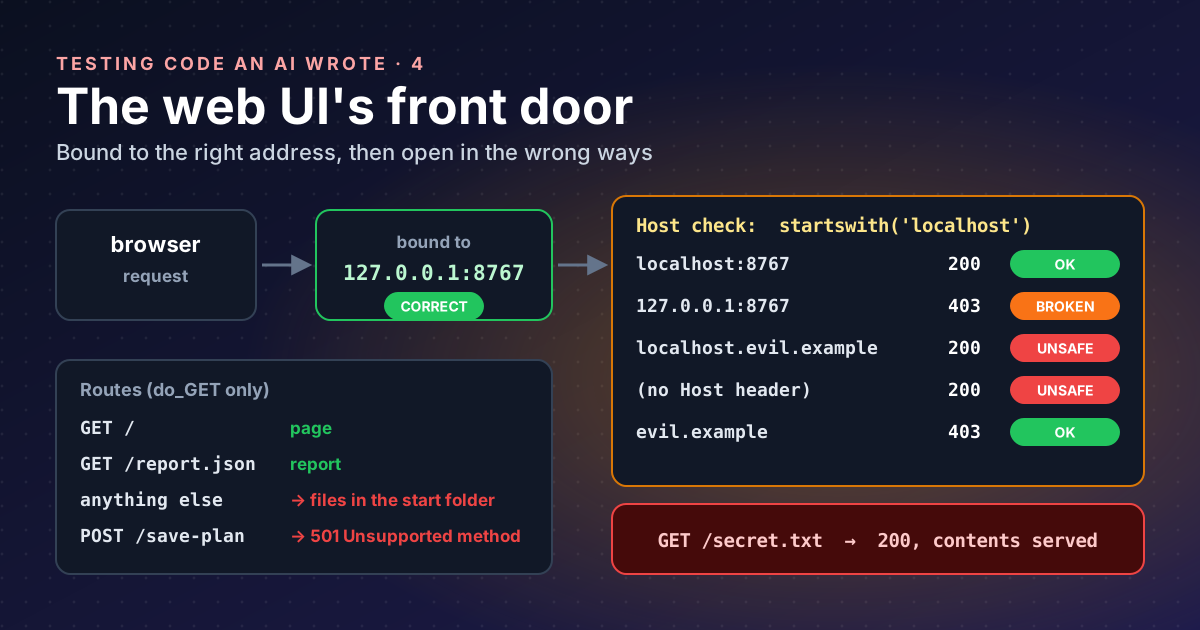
| Request | Status | Should be |
|---|---|---|
GET /, Host localhost:8767 | 200 | 200 |
GET /, Host 127.0.0.1:8767 (the address it prints) | 403 | 200 |
GET /, Host localhost.evil.example | 200 | 403 |
GET /, no Host header | 200 | 403 |
GET /, Host evil.example | 403 | 403 |
GET /secret.txt, Host localhost | 200, file contents | 404 |
POST /save-plan, what the page’s button sends | 501 | 200 |
Five of seven are wrong. Three different mistakes explain them.
Mistake 1: checking the first letters#
host_header = self.headers.get('Host', '')
if host_header and not host_header.startswith('localhost'):
    self.send_response(403)
startswith('localhost') refuses 127.0.0.1, the address the server itself prints, and accepts
localhost.evil.example. The if host_header and part lets a request with no Host header through.
Why does a server on 127.0.0.1 care about the Host header at all? Because of DNS rebinding. A web page on
evil.example cannot normally read responses from your local server; the browser’s same-origin rule stops it. But
the attacker controls the DNS for their own domain. They can answer first with their server’s address, so you load
their page, and then with 127.0.0.1. The browser still thinks it is talking to the same site, so the page’s
script can now read your local server’s responses. What gives the trick away is the Host header: the browser sends
the attacker’s domain name, not localhost.
NCC Group’s guidance for preventing DNS rebinding
is to accept only an exact list, for example 127.0.0.1:3000 and localhost:3000, and deny everything else. A
prefix check fails that test, and an attacker only needs a domain that starts with localhost.
Mistake 2: a file server hiding behind the app#
class DupfindHTTPRequestHandler(http.server.SimpleHTTPRequestHandler):
    def do_GET(self):
        ...
        if path == '/':
            self.serve_html()
        elif path == '/report.json':
            self.serve_report()
        elif path == '/save-plan':
            self.save_plan()
        else:
            super().do_GET()
Any path the app does not know falls through to
SimpleHTTPRequestHandler, which “serves files from the
directory directory and below, or the current directory if directory is not provided”. The app never sets a
directory, so it serves whatever folder you happened to be in when you typed dupfind serve. That is often your
home folder. The documentation adds that it “will follow symbolic links”, so even files outside that folder can be
served.
On its own that is reachable only from your machine. Combined with mistake 1, a rebinding page whose domain starts
with localhost could read your files. The Python documentation is blunt about the module:
“http.server is not recommended for production. It only implements basic security checks.”
Mistake 3: the button that cannot work#
The page saves the plan with fetch('/save-plan', { method: 'POST', ... }). The handler only defines do_GET.
http.server looks for a method named after the request (for POST, do_POST), and when there is none it
answers 501:
code 501, message Unsupported method ('POST')Meanwhile /save-plan is routed under GET, where it reads self.headers['Content-Length']. A plain GET has no body
and no such header, so that path raises an error instead. The one feature the page exists for, saving a plan, can
never work.
One more: file names as HTML#
The page builds each row with innerHTML and the file path pasted in:
fileDiv.innerHTML = `
    <input type="checkbox" id="${file.path}" value="${file.path}">
    <label for="${file.path}">${file.path}</label>
`;
On Linux, a file name can contain < and >. MDN calls innerHTML “probably the most common vector for
cross-site scripting (XSS) attacks” and shows
an <img src='x' onerror=...> string running code. A file named that way in a scanned folder could run script in
the page. I did not build such a file for this post; the mechanism is the one MDN demonstrates. OWASP’s
DOM-based XSS cheat sheet
gives the fix: “The most fundamental safe way to populate the DOM with untrusted data is to use the safe
assignment property textContent.”
What the fix looks like#
Start from BaseHTTPRequestHandler, which serves nothing by default, so only routes you write exist:
from http.server import BaseHTTPRequestHandler

ALLOWED_HOSTS = {f"127.0.0.1:{PORT}", f"localhost:{PORT}"}

class Handler(BaseHTTPRequestHandler):
    def host_ok(self) -> bool:
        if self.headers.get("Host") not in ALLOWED_HOSTS:
            self.send_error(403)
            return False
        return True

    def do_GET(self):
        if not self.host_ok():
            return
        if self.path == "/":
            self.send_page()
        elif self.path == "/report.json":
            self.send_report()
        else:
            self.send_error(404)

    def do_POST(self):
        if not self.host_ok():
            return
        if self.path != "/save-plan":
            return self.send_error(404)
        length = int(self.headers.get("Content-Length", 0))
        plan = json.loads(self.rfile.read(min(length, 10_000_000)))
        ...  # check it is a list of paths that appear in the report, then write plan.json
And in the page, set textContent on a label element, never paste paths into innerHTML.
Where the series leaves the app#
| Area | Verdict |
|---|---|
| reading first (part 1) | deletes reachable only from clean and restore |
| install and tests (part 2) | installs; tests need two undeclared packages; 5 of 8 pass |
| cleaner (part 3) | does nothing as shipped; one fix away from unsafe |
| web UI (part 4) | right address, wrong Host check, leaks files, cannot save |
The model got the shape right everywhere: the commands, the options, even the names of the safety rules. It got the details wrong in exactly the places where details are the whole point. That is my main lesson from four posts of testing: generated code is a confident first draft, and its safety claims are hypotheses until you test them.
Still open: scoring how well it actually finds duplicates, and the same tests against the version Ollama wrote.
Takeaways#
- Binding to
127.0.0.1is necessary but not enough; check the Host header against an exact allowlist. - DNS rebinding turns “only reachable locally” into “reachable from a web page”, which is why the Host check matters.
- Never subclass
SimpleHTTPRequestHandlerfor an app; start fromBaseHTTPRequestHandlerand write each route. - A UI button is a test case: if the page POSTs, the handler needs
do_POST. - Put untrusted strings, including file names, into the page with
textContent, notinnerHTML.
References#
- http.server: HTTP servers: Python documentation, the production warning, what
SimpleHTTPRequestHandlerserves, symbolic links, anddo_<METHOD>dispatch - Preventing DNS rebinding attacks: NCC Group, Singularity wiki, the exact Host allowlist for loopback services
- Element: innerHTML property: MDN, the security considerations and the
onerrorexample - DOM based XSS prevention cheat sheet: OWASP,
textContentas the safe sink