systemd is the replacement system for System V and with the primary goal of starting services in parallel.
Remember
initlevels?
GRUB: Grand Unified Boot Loader
— /boot/grub/grub.conf
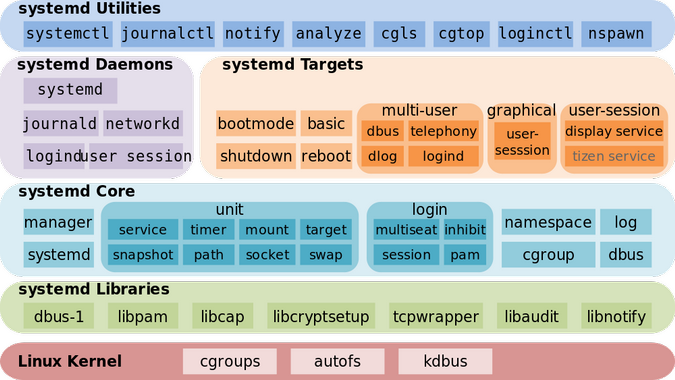
Some key points
systemdis PID 1- Major points in a boot-up process
- There are two sequences of events that are required to boot a Linux computer and make it usable: boot and startup.
- The boot sequence starts when the computer is turned on, and is completed when the
kernelis initialized and systemd is launched. - startup process takes over after
bootis complete and finishes the task of getting the Linux computer into an operational state. - BIOS - Power on self test
- BIOS POST checks the basic operability of the hardware and then it issues an interrupt, which locates the boot sectors on any attached bootable devices
- Boot loader
- First stage - The first boot sector with valid boot record (MBR) is loaded into RAM and control is then transferred to the code that was loaded from the boot sector.
- Kernel Initialization
- The primary function of boot loader like GRUB is to get the Linux kernel loaded into memory and running.
- Once the kernel has extracted itself, it loads systemd, and turns control over to it.
- Start
systemd- mother of all processes.- It is responsible for bringing the Linux host up to a state in which productive work can be done.
- First
systemdmounts the filesystems as defined by /etc/fstab
ls /etc/systemd#
total 40
 0 drwxr-xr-x.   4 root root  151 Aug 31 08:45 .
12 drwxr-xr-x. 145 root root 8192 Aug 31 08:46 ..
 4 -rw-r--r--.   1 root root  720 Aug  6 17:30 bootchart.conf
 4 -rw-r--r--.   1 root root  615 Aug  6 17:30 coredump.conf
 4 -rw-r--r--.   1 root root  983 Aug  6 17:30 journald.conf
 4 -rw-r--r--.   1 root root  968 Jan 28  2019 logind.conf
 4 drwxr-xr-x.  19 root root 4096 Aug  6 17:30 system
 4 -rw-r--r--.   1 root root 1552 Aug  6 17:30 system.conf
 0 drwxr-xr-x.   2 root root    6 Aug  6 17:30 user
 4 -rw-r--r--.   1 root root 1127 Aug  6 17:30 user.conf
If POST fails, the computer may not be usable and so the boot process does not continue.
Example: /etc/fstab#
#
# /etc/fstab
# Created by anaconda on Mon Jan 28 20:51:49 2019
#
# Accessible filesystems, by reference, are maintained under '/dev/disk'
# See man pages fstab(5), findfs(8), mount(8) and/or blkid(8) for more info
#
UUID=f41e390f-835b-4223-a9bb-9b45984ddf8d /                       xfs     defaults        0 0
Note that targets and services are
systemd units.Targets: /etc/systemd/system#
root@docker>ls -als system
total 16
4 drwxr-xr-x. 19 root root 4096 Aug  6 17:30 .
0 drwxr-xr-x.  4 root root  151 Aug 31 08:45 ..
0 drwxr-xr-x.  2 root root   57 Jan 28  2019 basic.target.wants
0 drwxr-xr-x.  2 root root   31 Mar 18  2019 bluetooth.target.wants
0 drwxr-xr-x.  2 root root  119 Jul 28 07:54 cloud-init.target.wants
0 lrwxrwxrwx.  1 root root   41 Mar 18  2019 dbus-org.bluez.service -> /usr/lib/systemd/system/bluetooth.service
0 lrwxrwxrwx.  1 root root   41 Mar 18  2019 dbus-org.fedoraproject.FirewallD1.service -> /usr/lib/systemd/system/firewalld.service
0 lrwxrwxrwx.  1 root root   44 Mar 18  2019 dbus-org.freedesktop.Avahi.service -> /usr/lib/systemd/system/avahi-daemon.service
0 lrwxrwxrwx.  1 root root   44 Mar 18  2019 dbus-org.freedesktop.ModemManager1.service -> /usr/lib/systemd/system/ModemManager.service
0 lrwxrwxrwx.  1 root root   46 Mar 18  2019 dbus-org.freedesktop.NetworkManager.service -> /usr/lib/systemd/system/NetworkManager.service
0 lrwxrwxrwx.  1 root root   57 Mar 18  2019 dbus-org.freedesktop.nm-dispatcher.service -> /usr/lib/systemd/system/NetworkManager-dispatcher.service
0 lrwxrwxrwx.  1 root root   37 Jan 28  2019 default.target -> /lib/systemd/system/multi-user.target
0 drwxr-xr-x.  2 root root  111 Mar 18  2019 default.target.wants
0 drwxr-xr-x.  2 root root   38 Jan 28  2019 dev-virtio\x2dports-org.qemu.guest_agent.0.device.wants
0 lrwxrwxrwx.  1 root root   35 Mar 18  2019 display-manager.service -> /usr/lib/systemd/system/gdm.service
0 drwxr-xr-x.  2 root root   32 Jan 28  2019 getty.target.wants
0 drwxr-xr-x.  2 root root  133 Mar 18  2019 graphical.target.wants
4 -rwxr-xr-x.  1 root root  435 Mar 18  2019 ir_agent.service
0 drwxr-xr-x.  2 root root   35 Jan 28  2019 local-fs.target.wants
4 drwxr-xr-x.  2 root root 4096 Jul 30 11:02 multi-user.target.wants
0 drwxr-xr-x.  2 root root   48 Mar 18  2019 network-online.target.wants
0 drwxr-xr-x.  2 root root   26 Mar 18  2019 printer.target.wants
0 drwxr-xr-x.  2 root root   31 Jan 28  2019 remote-fs.target.wants
0 drwxr-xr-x.  2 root root  217 Mar 18  2019 sockets.target.wants
4 drwxr-xr-x.  2 root root 4096 Mar 18  2019 sysinit.target.wants
0 drwxr-xr-x.  2 root root   44 Jan 28  2019 system-update.target.wants
0 drwxr-xr-x.  2 root root   34 Mar 18  2019 timers.target.wants
0 lrwxrwxrwx.  1 root root    9 Jan 28  2019 tmp.mount -> /dev/null
0 drwxr-xr-x. 2 root root 29 Mar 18 2019 vmtoolsd.service.requires/etc/systemd/system/default.target#
#  This file is part of systemd.
#
#  systemd is free software; you can redistribute it and/or modify it
#  under the terms of the GNU Lesser General Public License as published by
#  the Free Software Foundation; either version 2.1 of the License, or
#  (at your option) any later version.

[Unit]
Description=Multi-User System
Documentation=man:systemd.special(7)
Requires=basic.target
Conflicts=rescue.service rescue.target
After=basic.target rescue.service rescue.target
AllowIsolate=yes
The After & Requires defines the dependencies.