
↓ Skip to main content
Linux

SSH Protocol

·2 mins

πŸ’¬ What is SSH protocol?

πŸ’¬ It is also referred to as Secure Shell, is a method for secure remote login from one computer to another. It is an alternative to telnet and rlogin

πŸ’¬ It protects the communications security and integrity with strong encryption.

πŸ’¬ How does it work?

πŸ’¬ – It works in client server model.

– The SSH client drives the connection setup and uses public key cryptography to verify the identity of the SSH server.

– Once a connection is established data that is transmitted is encrypted according to the parameters negotiated in the setup.

πŸ’¬ After the setup phase is done, SSH protocol uses strong symmetric encryption and hashing algorithms to ensure the privacy and integrity of the data that is exchanged.

RFC – Link
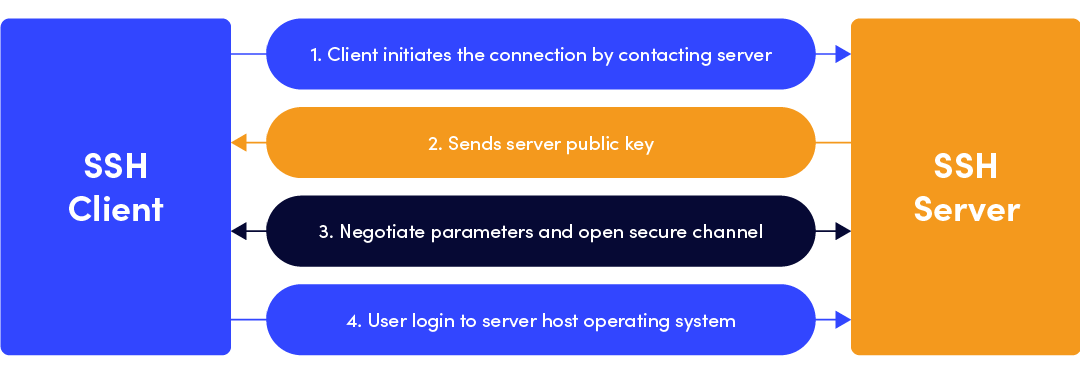
From SSH.com
From SSH.com

πŸ’¬ What are the options to initiate SSH?

πŸ’¬ Amongst the several methods available the most common ones are passwords and public key authentication.

πŸ’¬ In most of automation cases the public key authentication method is preferred. (ANSIBLE uses it)

πŸ’¬ Is it driven via a cryptographic key pair – public key and private key?

πŸ’¬ Duh?

The keys used for authentication are called SSH keys.

Configure the public key on a server toΒ authorize accessΒ and grant anyone who has a copy of the private key access to the server.

πŸ’¬ But WHY Public key?

πŸ’¬ – Why not – It is passwordless login, and yet more secure?

– The motivation for using public key authentication over simple passwords is security.

– Public key authentication provides cryptographic strength that even extremely long passwords can not offer


Author
Samarthya
Engineer, learner, tinkerer. This is my trophy shelf of everyday work and leisure.

Related

ssh-keygen & ssh-copy-id

·2 mins
ssh-keygen allows generation of new key pair for authentication (SSH). > ssh-keygen --help unknown option -- - usage: ssh-keygen [-q] [-b bits] [-t dsa | ecdsa | ed25519 | rsa | rsa1] [-N new_passphrase] [-C comment] [-f output_keyfile] ssh-keygen -p [-P old_passphrase] [-N new_passphrase] [-f keyfile] ssh-keygen -i [-m key_format] [-f input_keyfile] ssh-keygen -e [-m key_format] [-f input_keyfile] ssh-keygen -y [-f input_keyfile] ssh-keygen -c [-P passphrase] [-C comment] [-f keyfile] ssh-keygen -l [-v] [-E fingerprint_hash] [-f input_keyfile] ssh-keygen -B [-f input_keyfile] ssh-keygen -D pkcs11 ssh-keygen -F hostname [-f known_hosts_file] [-l] ssh-keygen -H [-f known_hosts_file] ssh-keygen -R hostname [-f known_hosts_file] ssh-keygen -r hostname [-f input_keyfile] [-g] ssh-keygen -G output_file [-v] [-b bits] [-M memory] [-S start_point] ssh-keygen -T output_file -f input_file [-v] [-a rounds] [-J num_lines] [-j start_line] [-K checkpt] [-W generator] ssh-keygen -s ca_key -I certificate_identity [-h] [-n principals] [-O option] [-V validity_interval] [-z serial_number] file ... ssh-keygen -L [-f input_keyfile] ssh-keygen -A ssh-keygen -k -f krl_file [-u] [-s ca_public] [-z version_number] file ... ssh-keygen -Q -f krl_file file ... ssh-keygen -t rsa Generating public/private rsa key pair. Enter file in which to save the key (/root/.ssh/id_rsa): Enter passphrase (empty for no passphrase): Enter same passphrase again: Your identification has been saved in /root/.ssh/id_rsa. Your public key has been saved in /root/.ssh/id_rsa.pub. The key fingerprint is: SHA256:KjqBCXEEFIBOOPDJ6j45tOBogwggxw3pAqECLG/r9fI root@mymachine.net The key's randomart image is: +---[RSA 2048]----+ |%* . | |%==. | |O*+o | |*o* . | |=* . S | |*.o . . | |Oooo... | |=Oo.... | |..=. oE | +----[SHA256]-----+ SSH Keys

Notes: For self

·1 min
bash = & == Brackets [ bc awk Bash is a string oriented language We do not write step=$((step++)) this expression will return a numeric value which the shell will then take as the command to to be executed. No spaces are allowed around the equal sign for variable assignment. let "step++" is same as (( step++ )) Use declare to set variable values and attributes In bash = and == both mean the same thing πŸ’¬ What is the difference between [ and [[? β€’ if cd $dir; then In this case the command cd $dir will be executed and based on success or failure of the command executed the if or else part will be executed respectively. if [$dir]; then <span class="absolute top-0 w-6 transition-opacity opacity-0 -start-6 not-prose group-hover:opacity-100 select-none"> <a class="text-primary-300 dark:text-neutral-700 !no-underline" href="#if-dir-then" aria-label="Anchor">#</a> </span> Single bracket is equivalent to test command evaluate conditional expression β€’ < & > Within [ compare using simple ASCII ordering & within [[ comparison is lexicographic. Within [ you have to escape \> to avoid redirection. πŸ’¬ BC is a language?

ServiceAccount

If you have seen errors like these when deploying using a serviceAccount Error: INSTALLATION FAILED: rendered manifests contain a resource that already exists. Unable to continue with install: could not get information about the resource ConfigMap "spinnaker-hellow-pipline" in namespace "spinnaker": configmaps "spinnaker-hellow-pipline" is forbidden: User "system:serviceaccount:jenkins:default" cannot get resource "configmaps" in API group "" in the namespace "spinnaker" What? # A service account provides an identity for processes that run in a Pod. Every namespace has a default service account When you create a pod, if you do not specify a service account, it is automatically assigned the default service account in the same namespace. To use a non-default service account, set the spec.serviceAccountName field of a pod to the name of the service account you wish to use. The service account has to exist at the time the pod is created, or it will be rejected. The service account of an already created pod cannot be updated Default RBAC policies grant scoped permissions to control-plane components, nodes, and controllers, but grant no permissions to service accounts outside the kube-system namespace (beyond discovery permissions given to all authenticated users). β€” Official documentation Example # apiVersion: v1 kind: ServiceAccount metadata: creationTimestamp: "2021-08-27T07:52:20Z" name: default namespace: default resourceVersion: "XXXX" uid: XXXX secrets: - name: default-token-vcb75 Let’s add docker-registry secret to the SA. (My secret name is samarthya-docker)