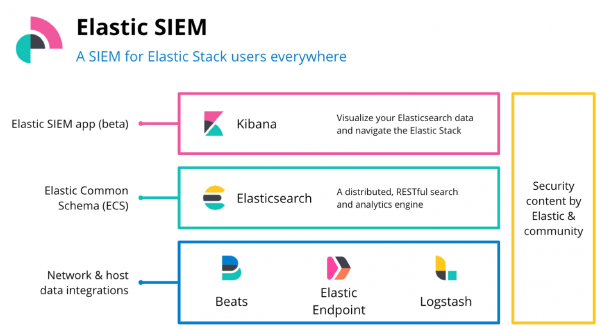
Security is integral to every and all the tasks in a shared environment. In ELK if you have setup a cluster which is accessible to all; anyone can make modifications which may or may not impact the other users.
Elastic cluster#
The nodes that form the cluster, Kibana instances, Beats agents and clients all together form a cluster.
Why secure it?#
In basic licensing (default), elastic comes with minimal security and it is accessible to all who know the URL or the machine location. To prevent this unauthorized access to your elastic cluster you need to authenticate user.
The Elasticsearch security features enable you to authorize users, assign access privileges to roles, and assign those roles to users.
Useful links#
- https://www.elastic.co/guide/en/elasticsearch/reference/current/setup-passwords.html
- https://www.elastic.co/guide/en/elasticsearch/reference/7.5/security-privileges.html
- https://www.elastic.co/guide/en/elasticsearch/reference/7.5/built-in-users.html
- https://www.elastic.co/guide/en/elasticsearch/reference/7.5/built-in-users.html#bootstrap-elastic-passwords
- https://www.elastic.co/guide/en/elasticsearch/reference/current/security-api.html
Securing the cluster#
Elasticsearch uses TLS to perform encryption of the messages and the authentication of different nodes.
TLS for communication#
You can generate your own certificates using a tool called elasticsearch-certutil which takes care of generating a CA and signing certificate with it.
Example Cluster#
GET _cluster/health

{
   "cluster_name" : "samarthya",
   "status" : "green",
   "timed_out" : false,
   "number_of_nodes" : 3,
   "number_of_data_nodes" : 3,
   "active_primary_shards" : 7,
   "active_shards" : 14,
   "relocating_shards" : 0,
   "initializing_shards" : 0,
   "unassigned_shards" : 0,
   "delayed_unassigned_shards" : 0,
   "number_of_pending_tasks" : 0,
   "number_of_in_flight_fetch" : 0,
   "task_max_waiting_in_queue_millis" : 0,
   "active_shards_percent_as_number" : 100.0
 }
RBAC : Role-Based Access Control#
Using roles and users you can enable security in elastic cluster.
Terms#
User: Authenticated user
Role: Named set of permissions
Permission: Set of one or more privileges against the secured resource. E.g. read, delete, manage
Privilege: Named group of one or more actions that a user may execute.
Secured resource: A limited access resource. E.g Indices, Aliases, documents, fields, users and the cluster itself.
Security APIs#
Elastic offers security (dedicated) api’s to
- Authenticate
- Clear Cache
- Delegate PKI authentication
- Privileges check
- SSL certificate
More details available here.
API – Example#
To create a user via API simply use
POST _security/user/test
 {
   "password" : "testpassword",
   "roles" : [ "kibana_dashboard_only_user"],
   "full_name" : "API User",
   "email" : "test@test.com",
   "metadata" : {
     "hometown" : "Springfield",
     "age": 40,
     "description": "stop at nothing."
   }
 }
Returns
{
   "created" : true
 }
To check the details of the created user
GET _security/user/testIt should return the details we furnished while creating it.
{
   "test" : {
     "username" : "test",
     "roles" : [
       "kibana_dashboard_only_user"
     ],
     "full_name" : "API User",
     "email" : "test@test.com",
     "metadata" : {
       "hometown" : "Springfield",
       "description" : "stop at nothing.",
       "age" : 40
     },
     "enabled" : true
   }
 }
When done deleting this user is as simple as issuing a command
DELETE _security/user/testRealms#
Authentication in the Elastic Stack security features is handled by one or more authentication services called realms. A realm is used to resolve and authenticate users based on authentication tokens.
Realms can be roughly two categories Internal & External.
Internal#
Requires no communication with external parties, completely internal to Elasticsearch. There can be maximum one configured internal realm type.
E.g. NATIVE and FILEIndex .security#
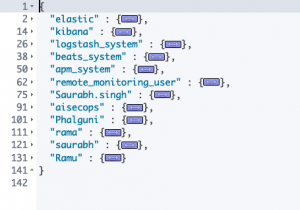
Built in users are stored in .security index (inside Native realm; details above). These users (mentioned below) have fixed set of roles, and their passwords needs to be setup before they can be used. This index is internally maintained by Elasticsearch.
The changes to any user (disabled, password change) are reflected across cluster automatically
Basic details#
elastic A built-in superuser. See Built-in roles.
kibana The user Kibana uses to connect and communicate with Elasticsearch.
logstash_system The user Logstash uses when storing monitoring information in Elasticsearch.
beats_system The user the Beats use when storing monitoring information in Elasticsearch.
apm_system The user the APM server uses when storing monitoring information in Elasticsearch.
remote_monitoring_user The user Metricbeat uses when collecting and storing monitoring information in Elasticsearch. It has the remote_monitoring_agent and remote_monitoring_collector built-in roles.
User – elastic#
This is the default superuser and have full access to cluster. Avoid using it for regular operations; create a user for daily use.
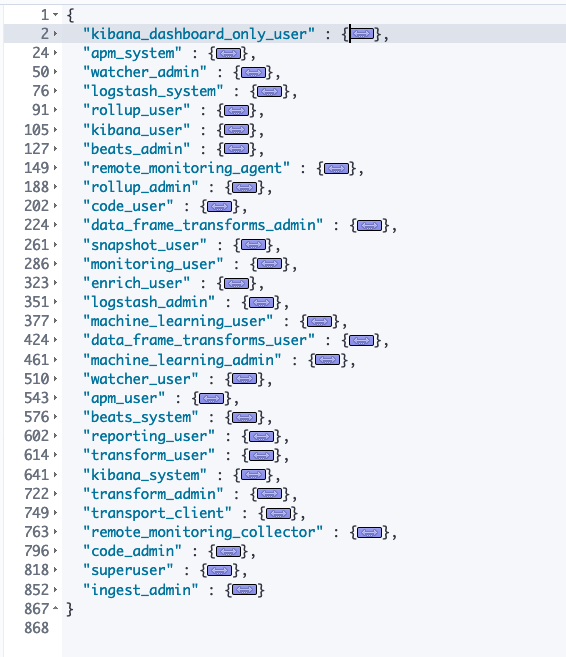
Roles#
External#
Realms that require external (third party) interaction. There can be as many external realms as required.
E.g. saml, kerberos, pki etc.Native Realm#
The default basic authentication – realm where the users are stored inside a dedicated index (.security). You can use the REST APIs or Kibana to add and remove users, assign user roles, and manage user passwords. The realm configurations are all done in elastic.yml
Other Realms#
ldap
active_directory
pki
file
saml
kerberos
oidc