Three services, three jobs#
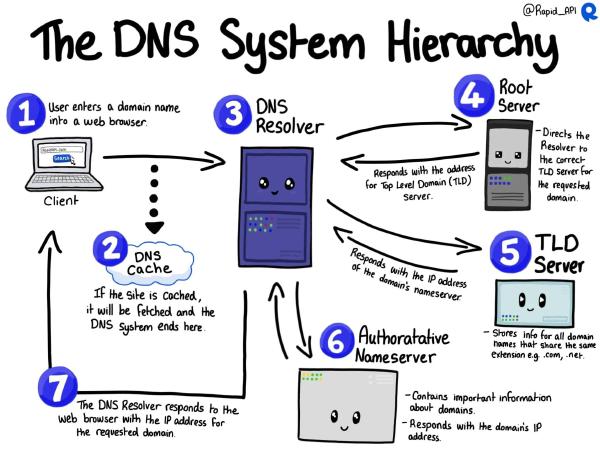
It helps to separate what used to be bundled at one host:
| Service | Job |
|---|---|
| Registrar | Rents the name. Only says which DNS servers to ask. |
| DNS (now Cloudflare) | Answers “where is samarthya.me, where does its mail go?” |
| GitHub Pages | Serves the website |
| The old host | Now only runs email |
Part 1: move DNS, change nothing#
The safest first step changes who answers DNS questions, not the answers themselves.
- Inventory the zone. The old host’s DNS panel held 63 records. Live checks showed most were leftovers: auto-generated panel records for every subdomain, one-time certificate tokens, subdomains long gone. 11 were actually needed. A DNS move is the cheapest clean-up you’ll ever get: what you don’t copy simply stops existing.
- Recreate those 11 in Cloudflare, all “DNS only” (grey). Mail can never go through Cloudflare’s proxy.
- Query Cloudflare’s nameservers directly before switching. They answer for your zone even while it’s pending, so you can check every record before anything goes live.
- Check DNSSEC is off at the registrar, then change the nameservers.
The registrar’s panel updated instantly; the .me registry caught up a few hours later. Nothing broke in
between, because old and new DNS gave identical answers.
Part 2: untangle mail from the website#
Here was the trap. The mail (MX) record pointed at samarthya.me itself. Point samarthya.me at GitHub, and the world’s mail servers would try to deliver my email to GitHub.
The fix is boring and essential: give mail its own name.
before:  MX → samarthya.me        (the website's name)
after:   MX → mail.samarthya.me   (a name that never moves)
Then wait for caches to expire before moving the website. Only then do the switch:
samarthya.me      A / AAAA  → GitHub Pages' addresses
www               CNAME     → <user>.github.io
mail, smtp, pop   unchanged → the mail host
GitHub issued an HTTPS certificate within minutes. The site rebuilt itself with the real domain baked in.
Lessons for me#
- Changing passwords after a breach can lock you out. A phone still retrying the old mail password looks exactly like an attack, and the host’s firewall banned my home connection. Update every device first.
- Cloudflare’s orange proxy isn’t free of trade-offs. In front of GitHub Pages it can block GitHub from renewing its own certificate, and in strict SSL mode an expired certificate means the site is down. The website stays “DNS only” for now; GitHub’s CDN is fast enough.
- Certificates remember names you’ve deleted. The old host’s certificate still listed retired subdomains, and its next renewal would fail on them, taking mail encryption down with it. Re-issue before the renewal date.
- Old links are an asset. Six years of search results and bookmarks still work, because the redirects were planned from day one.
- Slow is fast with DNS. Every step was verified before the next one, and nothing broke, including email.
Tips for you#
- Never point your MX record at your website’s name. Use
mail.yourdomain, so the website can move without touching email. - Lower your DNS TTLs (e.g. 300 seconds) a day before a migration, so mistakes and fixes spread in minutes, not hours.
- Clean up while you move. Copy only the DNS records you can explain; everything else stops existing on its own when the nameservers switch.
- Check your registrar for DNSSEC before changing nameservers. If it’s on, turn it off first, or the domain stops resolving.
- Verify your domain with your static host (GitHub Pages and others offer it), so nobody can claim it if your setup ever lapses.
- Turn on 2FA for the registrar and DNS provider. Whoever controls those controls your site and your email.
The whole series in one checklist#
Site: fewest possible plugins · no
admin user · regular exports + offline backups · consider going staticDomain: 2FA on registrar and DNS · mail on its own name · verify the domain with your host
If hit: contain → preserve evidence → change passwords everywhere → rebuild clean
Where it stands#
The blog is static, versioned in git and has nothing to hack. It’s published with a git push. The fall
cost some images and a few weekends. It also produced a better site, and this diary.
Fall. Get up. Build again.