The argparse module is a powerful tool for parsing command line arguments in Python. It provides an easy way to define the arguments required by your script and handle the input data passed to your script by the user.
Here are some best practices to properly use the argparse module:
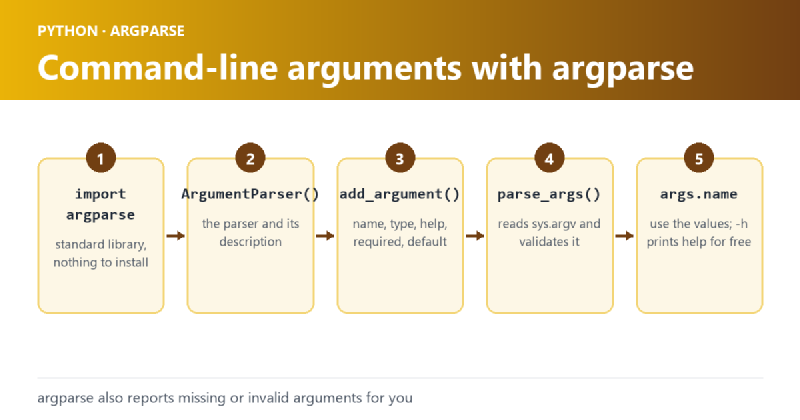
- Import the argparse module: Before you can use argparse, you need to import it into your script. This can be done by simply adding the following line of code at the top of your script:
import argparse- Create an ArgumentParser object: Next, you need to create an instance of the ArgumentParser class. This class is the main interface for parsing command line arguments. You can create an instance of this class by using the following code:
parser = argparse.ArgumentParser(description='This is a sample script')- Define the arguments: You can define the arguments required by your script using the add_argument method. You can specify the name of the argument, type of argument, help message and many other options.
Example#
parser.add_argument('-f', '--file', type=str, required=True, help='The file to be processed')
parser.add_argument('-l', '--lines', type=int, required=True, help='Number of lines to be read')- Parse the arguments: After you have defined all the required arguments, you can parse the input arguments passed to your script by the user using the parse_args method.
args = parser.parse_args()- Use the parsed arguments: You can access the parsed arguments using the
argsobject created in the previous step.
filename = args.file
number_of_lines = args.lines- Provide help: The
argparsemodule provides a built-in help system. When the user specifies the -h or –help argument, the help message for each argument will be displayed. - Error handling: You can also handle errors that may occur when parsing the arguments. For example, if a required argument is not specified, argparse will raise an error. You can catch this error and provide a custom error message to the user.
In conclusion, the argparse module is a powerful tool for parsing command line arguments in Python. By following the best practices outlined above, you can make the most of argparse to write scripts that are easy to use and provide a great user experience.
Sample project is available here on github