Pipelines is a smooth way of processing some incoming data. In this blog, I will walk through some of the items I have tried my hands on.
Pipeline#
A pipeline is a definition of a series of processors that are to be executed in the same order as they are declared.
Consists of two main fields
descriptionDescription or purpose of the pipelineprocessorsList of processors. Each processor transforms the document in some specific way.
- You might hear or ingest node, bulk api these concepts are not similar but do overlap.
- To use a pipeline, simply specify the pipeline parameter on an index or bulk request.
Ingest Node#
Ingest node pre-process’s documents before the actual document indexing happens. The ingest node intercepts bulk and index requests, it applies transformations, and it then passes the documents back to the index or bulk APIs.
All nodes in a cluster
enable ingest by default, so any node can handle ingest tasks.
To pre-process documents before indexing PIPELINES are used.
Some key considerations
- An index may also declare a default pipeline that will be used in the absence of the pipeline parameter.
- Index may also declare a final pipeline that will be executed after any request or default pipeline (if any).
How can we use it?#
It is as simple as specifying a parameter in the URL
PUT my-index/_doc/my-id?
pipeline=my_pipeline_id
{
“foo”: “bar”
}
Ingest API’s#
There are specifically 4 kinds of _ingest API’s
- PUT pipeline
- GET pipeline
- Delete pipeline
- Simulate pipeline
PUT Pipeline#
Allows to put create, or update a pipeline
PUT _ingest/pipeline/fix_my_locales {
“description”: " My first pipeline",
“processors”: []
}
Official documentation here.
fix_my_locales is the pipeline id that you wish to provide.
Input Parameters
description : string - Description of the ingest pipeline.
processors : array of processor objects - Array of processors (in order) used to pre-process documents before indexing.
version : integer - Optional version number used by external systems to manage ingest pipelines.
PUT _ingest/pipeline/transf_date
{
“description”: " Transforms the date.",
“version”: 1,
“processors”: [
{“set”: {
“field”: “cpem”,
“value”: “Covid”
}}
]
}
Unsetting the version is as simple as removing the version from the above request and reissuing the request.
A successful execution will be acknowledged by the node.
{
“acknowledged” : true
}
Processors#
- The processors in a pipeline have read and write access to documents that pass through the pipeline.
- The processors can access fields in the source of a document and the document’s metadata fields.
Accessing Data#
In the different type of processors that can be defined you can use fields defined in the index (mapping), the metadata fields, or the fields within the _source (if enabled)
Example#
PUT _ingest/pipeline/transf_date
{
  "description": " Transforms the date.",
  "version": 1,
  "processors": [
    {
      "set": {
        "field": "recieved",
        "value": "{{_ingest.timestamp}}"
      }
    },
    {
      "set": {
        "field": "firstname",
        "value": "{{_source.name}}"
      }
    }
  ]
}
Let’s simulate the pipeline to check the results
POST _ingest/pipeline/transf_date/_simulate?verbose
{
  "docs": [
    {
      "_index": "rama",
      "_id": 1,
      "_source": {
        "name": "abar"
      }
   }
  ]
}
The pipeline defines a field recieved which will be populated with the time at which the data is ingested & field firstname will be populated with the name field in the _source
{
  "docs" : [
    {
      "processor_results" : [
        {
          "doc" : {
            "_index" : "rama",
            "_type" : "_doc",
            "_id" : "1",
            "_source" : {
              "name" : "abar",
              "recieved" : "2020-04-23T16:03:23.213722Z"
            },
            "_ingest" : {
              "timestamp" : "2020-04-23T16:03:23.213722Z"
            }
          }
        },
        {
          "doc" : {
            "_index" : "rama",
            "_type" : "_doc",
            "_id" : "1",
            "_source" : {
              "name" : "abar",
              "firstname" : "abar",
              "recieved" : "2020-04-23T16:03:23.213722Z"
            },
            "_ingest" : {
              "timestamp" : "2020-04-23T16:03:23.213722Z"
            }
          }
        }
      ]
    }
  ]
}
Metafields that can be accessed are
- _index
- _id
- _routing
Beyond metadata fields and source fields, ingest also adds ingest metadata to the documents that it processes like the _ingest.timestamp.
DELETE Pipeline#
Is invoked when you wish to delete a pipeline
DELETE_ingest/pipeline/Testing
GET Pipeline#
Returns a mentioned pipeline
GET_ingest/pipeline
Returns all the pipelines that are active in the cluster.
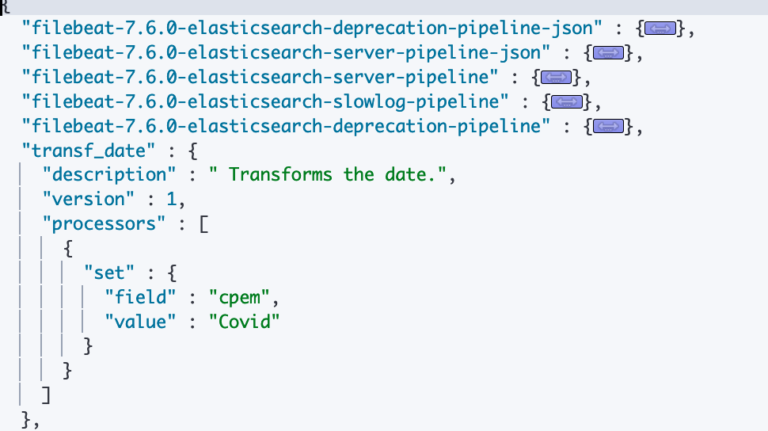
GET _ingest/pipeline/transf_date
For information on a specific pipeline you can specify the name in the request and it should return the information
{
“transf_date” : {
“description” : " Transforms the date.",
“version” : 1,
“processors” : [
{
“set” : {
“field” : “cpem”,
“value” : “Covid”
}
}
]
}
}
If we just want to see the Version information we can utilise the response filtering.
GET_ingest/pipeline/transf_date?filter_path=*.versionor
GET _xpack?filter_path=license
All REST APIs accept a filter_path parameter that can be used to reduce the response returned by Elasticsearch.
Simulate Pipeline#
Simulate and validate the pipeline for the processors used in the Pipeline
POST _ingest/pipeline/fix_locales/_simulate
{
“docs”: []
}
Simulate allows you to validate the logic that the pipeline executes against simulated docs.
POST /_ingest/pipeline/
GET /_ingest/pipeline/
POST /_ingest/pipeline/_simulate
GET /_ingest/pipeline/_simulate
POST _ingest/pipeline/transf_date/_simulate?verbose
{
     "docs": [
                     {
                         "_index": "rama",
                         "_id": 1,
                        "_source": {
                               "foo": "abar"
                          }
                     }
                 ]
}