↓ Skip to main content
Life

Personal Access Token

·1 min
Table of Contents

In case you are still using the basic/auth it is time to move to personal access token.

Official documentation is the best guide.

Personal access tokens (PATs) are an alternative to using passwords for authentication to GitHub Enterprise Server when using the GitHub API or the command line.

Step 1:
#

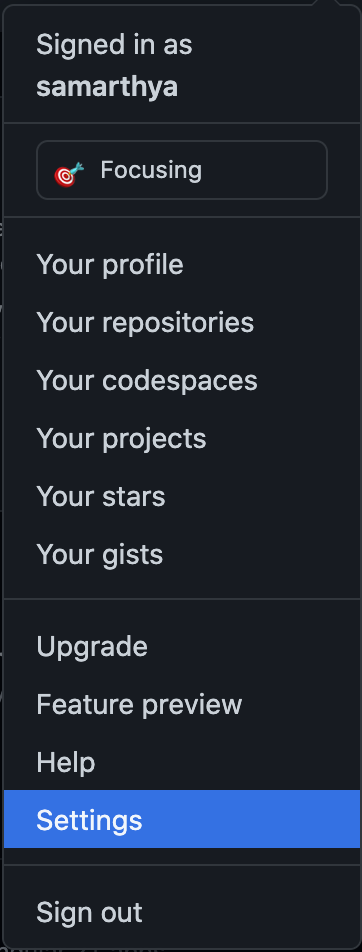
Go to the settings from the

top right
top right
GitHub profile menu with Settings highlighted

Once you navigate into settings, you have to select

GitHub Developer settings button
GitHub Developer settings sidebar: GitHub Apps, OAuth Apps and Personal access tokens

Select Personal access tokens, and then click Generate new token in the next scren

GitHub Personal access tokens page with the Generate new token button

Select the appropriate name and scope for the token.
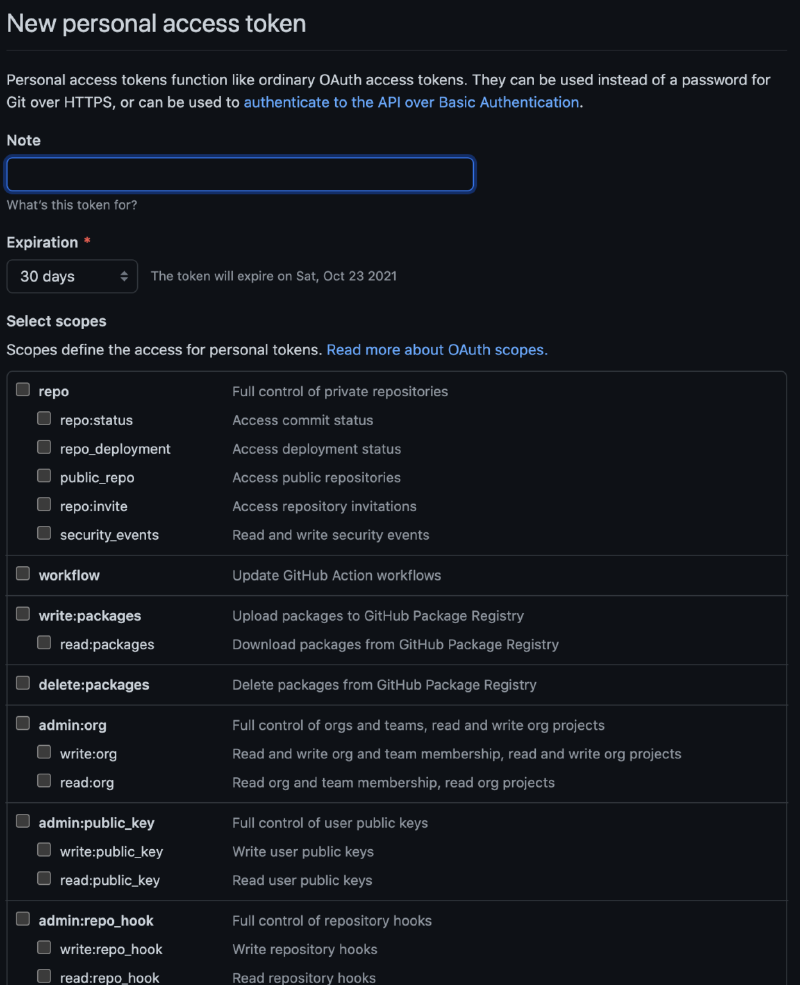
GitHub New personal access token form: note, 30-day expiration and scope checkboxes

Once you are done click Generate

Generated token release-plugin-test with admin:org, admin:repo_hook, delete_repo, repo and write:packages scopes, expiring 23 Oct 2021

Once added you can use that as part of the scm plugin in the main pom, or use it in the settings.xml. In my case I am using it in server.xml but need to add the property project.scm.id so that you refer the credentials.

<project.scm.id>github.com</project.scm.id>

Author
Samarthya
Engineer, learner, tinkerer. This is my trophy shelf of everyday work and leisure.

Related

Building your artifact(s)

·7 mins
Everything starts form a single source file and as the time goes by, it gradually transforms into multiple modules, bulky source files and a source control repository. Mostly by this time the team has already adopted a a build tool, and a repository to publish the versioned artifacts. Journey is similar for every project successful or not.

Maven Profiles

·2 mins
The concept of profiles let’s a developer define what he wants to build and what to do in specific cases. In this blog I will talk about the problem that I solved using profiles.

Ingress

·4 mins
All right, it has been sometime since I last wrote my blog, and it has been disappointing not to have found enough time to collate and put my thoughts in a simple worded doc; better late then never. So, here I am trying to reignite the pursuit of writing at least once a week.