In parts 2 and 3 I used a project built to be vulnerable. This time the target is the repository behind this site: Hugo, the Blowfish theme as a git submodule, some Python helper scripts and two GitHub Actions workflows. All runs used OSV-Scanner v2.7.0.
Setup, and the first surprise#
The setup is one binary, checked against its published checksums as in part 2. Then the obvious command, from the root of the repository:
osv-scanner scan source .No package sources found, --help for usage information.Exit code 128. A site like this has no package.json of its own, and without -r the scanner looks only at the
top folder. The docs define 128 as “no packages found”. Worth
remembering: a scan that looked at nothing is not the same as a clean scan.
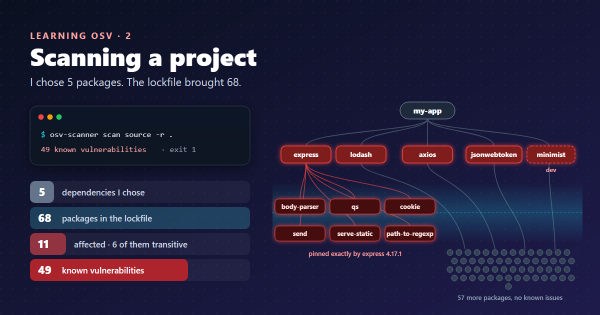
osv-scanner scan source -r .Scanned themes/blowfish/go.mod file and found 1 package
Scanned themes/blowfish/package-lock.json file and found 272 packages
Scanned themes/blowfish/scripts/package-lock.json file and found 179 packages
Total 6 packages affected by 8 known vulnerabilities
(1 Critical, 2 High, 4 Medium, 0 Low, 1 Unknown) from 1 ecosystem.That took under four seconds. Every lockfile it found belongs to the theme.
Reading the 8 findings#
| Package | Version | Tag | Advisories | Used by |
|---|---|---|---|---|
| dompurify | 3.4.16 | dev | 3, top CVSS 9.2 | mermaid, the theme’s diagram library |
| glob | 13.0.6, 10.5.0 | dev, optional | 1 in each lockfile | Theme tooling |
| minimatch | 10.2.6, 9.0.9 | dev, optional | 1 in each lockfile | Theme tooling |
| zod | 3.25.76 | dev | 1 | Theme tooling |
My first instinct was to wave all of it away, since it says dev. My deploy workflow
never runs npm: Hugo builds from files the theme has already committed. So glob, minimatch and zod never run
anywhere I control. Those five rows really can wait.
DOMPurify was different, and this is where I started reading rather than sorting.
dev does not mean “does not ship”#
The theme lists mermaid as a dev dependency, then keeps a built copy of it in assets/lib/mermaid/. That file goes
to readers’ browsers on the six posts of mine with Mermaid charts. So I searched inside it:
"DOMPurify");if(t.version="3.4.12"The bundle carries DOMPurify 3.4.12. The lockfile says 3.4.16. Asking the OSV API about each version:
| Version | Where | Known advisories |
|---|---|---|
| 3.4.16 | The lockfile, what the scanner reported | 3 |
| 3.4.12 | The bundle, what readers actually get | 5 |
So the label was wrong for my situation and the count was low. Is it urgent? I don’t think so. All five advisories
need options such as IN_PLACE, SAFE_FOR_TEMPLATES or an unusual PARSER_MEDIA_TYPE
(example). In the minified bundle those names appear only where
DOMPurify reads its own configuration, my theme’s setup passes no custom config, and the only diagrams on the page are
ones I wrote. That is my reading of minified code, not proof, so I am keeping it on a short review date rather than
dismissing it.
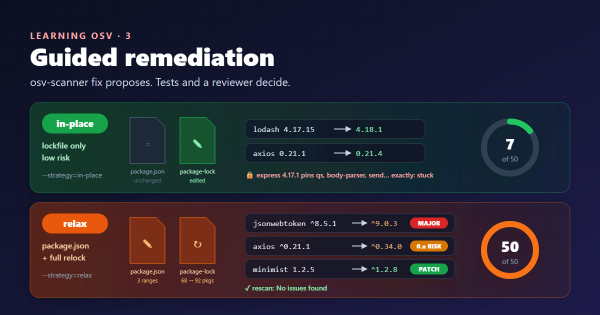
I am already on the latest theme release (v3.9.0), so the fix has to come from upstream. osv-scanner fix confirmed
the trap: on a copy of the lockfile it could fix 3 of 6 by moving dompurify to 3.4.17, but that changes the lockfile,
not the bundle. The report would go green and readers would get exactly the same file.
The finding that was not in the report#
Then I asked what the scanner never looked at. One of my slide decks loads its libraries straight from a CDN:
<script src="https://cdn.jsdelivr.net/npm/mermaid@11.4.1/dist/mermaid.min.js"></script>A <script> tag is not a manifest, so this version never appears in a scan. I asked the API anyway:
curl -s -X POST https://api.osv.dev/v1/query \
  -d '{"package":{"name":"mermaid","ecosystem":"npm"},"version":"11.4.1"}'
Nine known vulnerabilities, in a library I picked myself. Two of them are cross-site scripting. And having just
learnt to look inside bundles, I looked inside this one: it carries DOMPurify 3.2.1, which has another 23. The
deck also set securityLevel: "loose", which by
Mermaid’s definition allows HTML tags in diagram text. Again the input is
only my own diagrams, so the real risk is small, but this was the one problem entirely mine to fix, and the scanner
reported nothing.
Here is the whole picture as I found it:
| What runs | Does the scan see it? | Status |
|---|---|---|
| Theme tooling | Yes, 5 rows | Never runs in my pipeline |
| DOMPurify in the Mermaid bundle | Yes, with the wrong version and tag | Low risk; needs a theme release |
mermaid@11.4.1 from a CDN | No | 9 advisories, plus 23 in its DOMPurify; mine to fix |
| Python helpers (Pillow 12.1.1, PyYAML) | No, no lockfile | Pillow has 59 advisories; run only on my machine, on images I made |
| GitHub Actions in the workflows | No, in this run | Kept fresh by Dependabot |
| Hugo 0.167.0 | No | API shows none for the Go module |
Making the invisible visible#
The scanner reads SBOMs, so I can tell it what it cannot find. An SBOM (software bill of materials) is just a list of components. I wrote a small CycloneDX file by hand:
{
  "bomFormat": "CycloneDX",
  "specVersion": "1.5",
  "version": 1,
  "components": [
    { "type": "library", "name": "mermaid", "version": "11.4.1", "purl": "pkg:npm/mermaid@11.4.1" },
    { "type": "library", "name": "reveal.js", "version": "5.1.0", "purl": "pkg:npm/reveal.js@5.1.0" },
    { "type": "library", "name": "dompurify", "version": "3.4.12", "purl": "pkg:npm/dompurify@3.4.12" }
  ]
}
Named site-libs.cdx.json, it was picked up by -r with no extra flag, and the scan then reported the Mermaid and
theme-bundle DOMPurify findings: 14 in all. The catch is obvious: it is a list I maintain by hand, and it is
only as true as my memory of updating it.
For Python, a pip freeze into a requirements.txt works the same way; the docs
list that format.
Setting it up for this repository#
Two details here were specific to my repository, and I found both by testing.
Accepted risks need a root-level config. An osv-scanner.toml
applies only to its own folder. My findings live in a submodule
I don’t own, so a file there is not an option. Passing one explicitly works:
[[IgnoredVulns]]
id = "GHSA-3g3m-2fjr-6pw4"
ignoreUntil = 2027-02-01
reason = "glob: theme tooling only; my pipeline never runs npm"
osv-scanner scan source -r --config=osv-scanner.toml .GHSA-3g3m-2fjr-6pw4 and 1 alias have been filtered out because: glob: theme tooling only; my pipeline never runs npmThe stock GitHub workflow would see nothing. The
reusable workflow has a checkout-submodules input that
defaults to false.
I tested the effect with a clean clone: no submodule, no lockfiles, exit 128. So my workflow needs it switched on:
name: OSV-Scanner Scheduled Scan
on:
  schedule:
    - cron: "30 12 * * 1"
  push:
    branches: [main]
permissions:
  actions: read
  security-events: write
  contents: read
jobs:
  scan-scheduled:
    uses: "google/osv-scanner-action/.github/workflows/osv-scanner-reusable.yml@v2.7.0"
    with:
      checkout-submodules: true
      scan-args: |-
        --recursive
        --config=./osv-scanner.toml
        ./
I have tested the commands on my machine, but this workflow has not run on GitHub yet, so treat it as my plan rather than a proven recipe.
How I fixed the deck#
It looked like a one-line version bump. It took four attempts, and my checks passed on the ones that were wrong.
| Attempt | Mermaid | Its DOMPurify | Advisories | What happened |
|---|---|---|---|---|
| Starting point | 11.4.1 | 3.2.1 | 9 + 23 | Worked, but vulnerable |
| 1. Latest version | 12.3.0 | 3.4.17 | 0 + 0 | Every chart rendered, but labels wrapped early and layouts changed |
| 2. Last 11.x, to keep the layouts | 11.17.2 | 3.4.12 | 0 + 5 | Looked right; DOMPurify advisories remained |
| 3. 12.3.0 with the old layout engine | 12.3.0 | 3.4.17 | 0 + 0 | Flowcharts right; the mind map collapsed into a flat line |
| 4. Plus a layout for the mind map | 12.3.0 | 3.4.17 | 0 + 0 | All six charts right |
The Mermaid 12 release notes explain attempts 1
and 3: version 12 makes ELK the default layout engine and changes the default look, and you can opt out with
layout: dagre. They also say a mind map keeps its own layout “unless a layout is explicitly requested”, and my global
setting had requested one.
The final change:
-<script src="https://cdn.jsdelivr.net/npm/mermaid@11.4.1/dist/mermaid.min.js"></script>
+<script src="https://cdn.jsdelivr.net/npm/mermaid@12.3.0/dist/mermaid.min.js"></script>

-    securityLevel: "loose",
+    securityLevel: "strict",
+    layout: "dagre",
+    look: "classic",
-    flowchart: { htmlLabels: true, curve: "basis" }
+    flowchart: { htmlLabels: true, curve: "basis", wrappingWidth: 500 }
The mind map then asks for its own engine, in front matter at the top of its source. That only works at the very
start of the text, so the render function also needed a .trim():
---
config:
  layout: cose-bilkent
---
mindmap
  root((SSDLC))
My script reported “six charts rendered, none failed” for all of these attempts, including the flat mind map. Only
comparing before and after screenshots, slide by slide, caught the problems. Moving to strict cost nothing: the deck
has no clickable diagrams and its <br/> line breaks still work.
Where things stand on 4 November 2026#
| Item | Status | Detail |
|---|---|---|
| Deck: Mermaid and its DOMPurify | Fixed | 32 known advisories down to 0; an SBOM scan of the deck’s libraries says “No issues found” |
Deck: securityLevel | Fixed | Now strict |
| DOMPurify 3.4.12 in the theme’s bundle | Open | 5 advisories; needs a theme release. Not yet raised with the theme |
| Theme tooling (glob, minimatch, zod) | Open, low risk | Never runs in my pipeline; ignore file tested, not yet committed |
| SBOM, config, GitHub workflow | Not yet in the repo | First two tested locally; workflow untested on GitHub |
| Pillow on my machine | Open | 59 advisories; used locally, on images I made |
Two honest footnotes. The plain scan still says 8, exactly as before: everything I fixed was invisible to it, which is why the SBOM has to come next. And “0 advisories” means none known today. Mermaid 12.3.0 came out the day before this scan, so it has had little time to collect any. That is the argument for a scheduled rescan, not a reason to relax.
What I learnt#
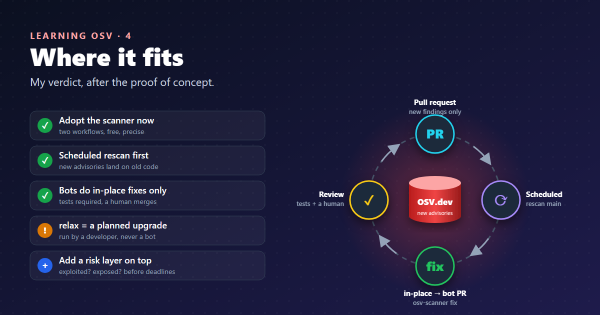
- A scanner reports on manifests, not on what you ship. On a static site those can be very different things.
devdescribes how a package is installed, not where its code ends up. Bundlers copy dev dependencies into production all the time.- A clean report needs a question after it: what did it look at? Exit 128 is the honest version of this. A green result with half the code unscanned is not.
fixcan turn a report green without changing what users get. Check the artefact, not the lockfile.- Asking “what runs here?” found more than the scan did, but the scan is what made me ask.
- Zero advisories is not a finished upgrade. My checks passed on a broken diagram. Read the release notes, then look at the result with your own eyes.
Takeaways#
- Use
-r, and treat exit 128 as a failure in CI. With submodules, check they are actually checked out. - Compare the report with what you really serve: bundles, CDN links, downloaded binaries.
- List what the scanner cannot find in a small SBOM, and accept that you now have to keep it up to date.
- Give every accepted risk a reason and an expiry date.
- After a security bump, compare before and after. “It rendered” is not “it is right”.
References#
- Output: OSV-Scanner docs, exit codes including 128
- Project source scanning: OSV-Scanner docs,
-r, SBOM detection,-L - Supported artifacts and manifests: OSV-Scanner docs, supported formats,
requirements.txtfrompip freeze - Configuration: OSV-Scanner docs, per-folder config,
--config,IgnoredVulns - GitHub Action and the reusable workflow source: Google, inputs and the
checkout-submodulesdefault - Guided remediation: OSV-Scanner docs, the
fixcommand - POST /v1/query: OSV.dev, the API used for version checks
- GHSA-cg2g-xh64-v4q7: OSV.dev, the DOMPurify configuration conditions
- Mermaid usage: securityLevel: Mermaid docs, what
looseallows - Mermaid 12.0.0 release notes: Mermaid, ELK as the default layout, the new look, the
layout: dagreopt-out, mind map behaviour - Blowfish releases: the theme version in use
- Title image: original illustration drawn for this post
Previous: part 4, where it fits.