Ansible’s lookup plugin allows you to access data from a variety of sources, including files, templates, and external programs. You can use lookup to fetch data dynamically at runtime and use it in your playbooks and roles.
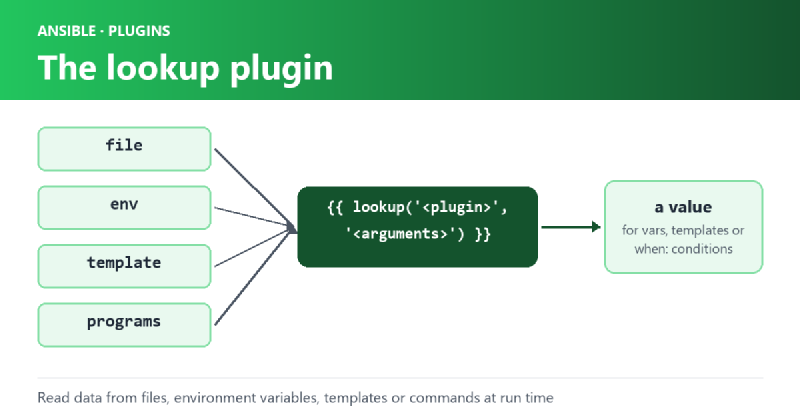
The lookup plugin is used in the following format:
{{ lookup('<plugin>', '<plugin arguments>') }}Here, <plugin> is the name of the plugin you want to use, and <plugin arguments> are any arguments that the plugin requires. The result of the plugin is then returned as a variable.
In this blog post, we will explore how to use the lookup plugin in Ansible, along with some examples of when and how to use it.
Using Lookup with When Condition#
One of the most common use cases of the lookup plugin is to conditionally execute a task based on the value of a variable. You can use the when keyword to specify a condition that determines whether or not the task should be executed.
Here’s an example of how to use lookup with a when condition:
- name: Copy file based on OS
  copy:
    src: "{{ lookup('env', 'HOME') }}/file.{{ 'exe' if ansible_os_family == 'Windows' else 'sh' }}"
    dest: /path/to/file
  when: ansible_os_family == 'Windows' or ansible_os_family == 'Linux'
In this example, we use lookup to retrieve the value of the HOME environment variable, and then concatenate it with the appropriate file extension based on the operating system. We then use this value as the source file for the copy module. The task is conditionally executed based on the value of the ansible_os_family variable.
Using Lookup to Read Data from a File#
Another common use case of the lookup plugin is to read data from a file and use it in a task. You can use the file plugin to read data from a file and store it as a variable.
Here’s an example of how to use lookup with the file plugin:
- name: Read data from file
  set_fact:
    data: "{{ lookup('file', '/path/to/file') }}"
In this example, we use lookup to read the contents of a file located at /path/to/file. The contents of the file are then stored as a variable named data.
Using Lookup with Loop#
You can also use the lookup plugin with a loop to iterate over a list of values and perform a task for each value. The with_items keyword is used to specify the list of values.
Here’s an example of how to use lookup with a loop:
- name: Create users
  user:
    name: "{{ item }}"
  with_items: "{{ lookup('file', '/path/to/userlist.txt').split('\n') }}"
In this example, we use lookup to read the contents of a file located at /path/to/userlist.txt, split the contents into a list of values, and then iterate over each value using a loop. For each value in the list, we create a user account using the user module.
Using Lookup with Templating#
You can also use the lookup plugin with templating to dynamically generate values at runtime. You can use variables, filters, and other Jinja2 templating features to customize the output of the lookup plugin.
Here’s an example of how to use lookup with templating:
- name: Create directories
  file:
    path: "{{ lookup('env', 'HOME') }}/{{ item }}/{{