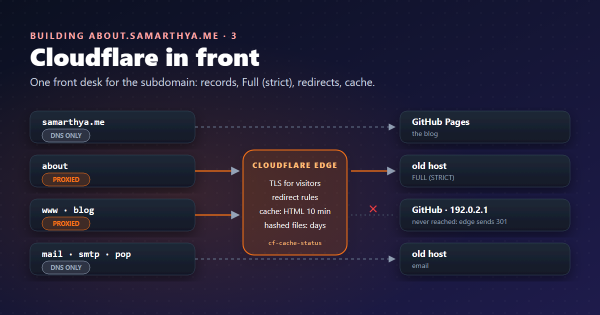
My domains already sit behind Cloudflare (I wrote about what that is and what it does for my sites). This is the first time it runs code for me: a few dozen lines that let people react to what’s on the site.
Keywords#
| Keyword | Meaning here |
|---|---|
| Static site | Pages built once into plain HTML, CSS and JavaScript files and served as they are. No code runs on the server when you visit. |
| Worker | A small JavaScript program that Cloudflare runs on its edge for every request to an address you choose. |
| D1 | Cloudflare’s serverless SQL database, with SQLite’s SQL. |
| Origin | The scheme, host and port a web page came from, such as https://samarthya.me. Browsers attach it to requests. |
| Upsert | “Insert this row, or update it if it already exists”, in one statement. |
Why a static site can’t count#
The blog is built by Hugo and hosted on GitHub Pages, which GitHub describes as “a static site hosting service that takes HTML, CSS, and JavaScript files straight from a repository”. That is exactly why I like it: nothing to patch, nothing to break in. It is also why a like button can’t work on its own. A count has to live somewhere, and a folder of files has nowhere to put it.
Bhanuni’s gallery is a page on the same site. She draws, I scan, the page grows. Family asked how to tell her they loved a drawing, and readers of the blog had the same problem with posts. I had switched comments off on purpose: comments need moderation, and a child’s page must never carry strangers’ words.
So the job was: one tap, no login, no free text, nothing personal kept.
The options I looked at#
| Option | What it stores | What a reader needs | Why I passed |
|---|---|---|---|
| giscus | GitHub Discussions | A GitHub account and authorising the app | Most of my readers (and all of the grandparents) don’t have one |
| utterances | GitHub issues | A GitHub account, same OAuth flow | Same, and it’s comments, which I didn’t want |
| A hosted comment service | Their database | Usually an account; often tracking scripts | More than I need, and someone else’s cookies on a child’s page |
| My own counter | A number per post or drawing | Nothing | Chosen: a few dozen lines on the free plan |
Giscus is clear about it: “visitors must authorize the giscus app to post on their behalf using the GitHub OAuth flow”. Fine for a developer blog’s comments; too much friction for a heart.
What the reader sees#
Ease of use was the whole point, so I wrote that part first and fitted the plumbing under it.
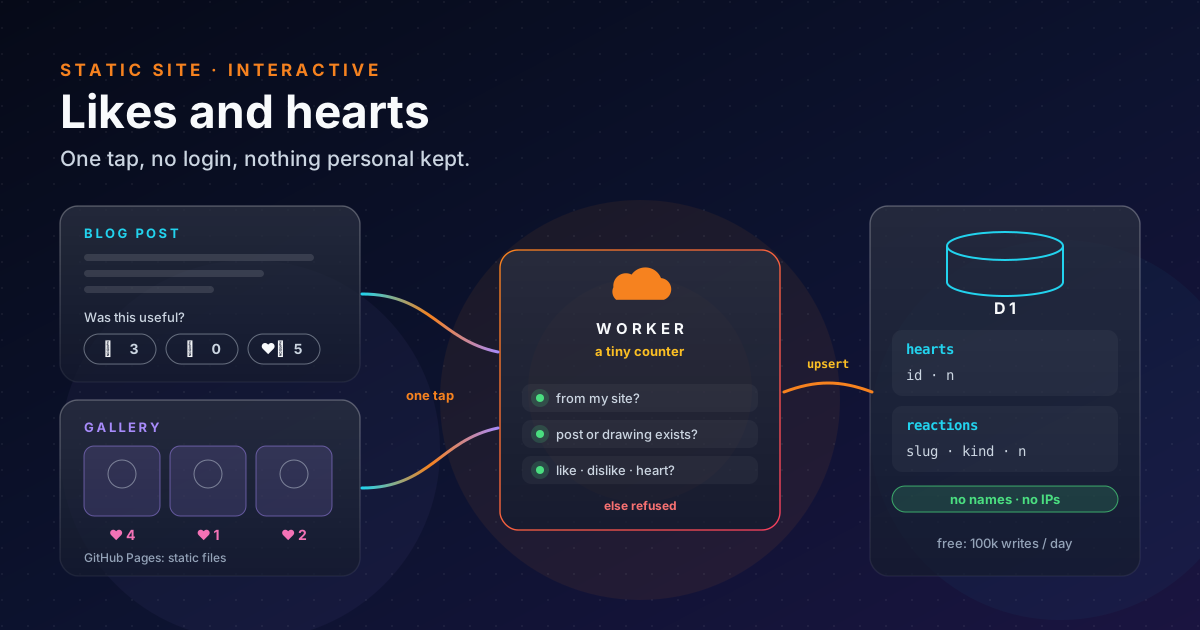
- On a post: at the end, “Was this useful?” and three buttons, 👍 👎 ❤️, each with its count.
- In the gallery: open a drawing and there is a ♡ button; the tiles show how many hearts each drawing has.
- One tap, no pop-up, no sign-in. The count goes up at once; the request goes in the background.
- One reaction per post per browser: after a tap, the other buttons on that post grey out. In the gallery, one heart per drawing per browser.
- If the counter is down, the buttons don’t appear. No broken widget, no spinner; the page just reads as before.
The “one per browser” memory is localStorage:
data kept per origin and “saved across browser sessions”. It can also throw, for example when the reader’s
browser is set to block stored data, so every read and write sits in a try. A blocked browser simply forgets
what it tapped.
On the blog the buttons needed no theme changes. Blowfish leaves a slot for comments: “provide a
layouts/partials/comments.html” and set showComments to true in
its docs’ words. I put the reactions in that file instead of comments.
The design: one Worker, two tiny tables#
One Worker serves both features, at hearts.bhanuni.in. It is a
Custom Domain, where “Cloudflare
will create DNS records and issue necessary certificates on your behalf”. I didn’t touch DNS or TLS by hand.
| Request | Answer |
|---|---|
GET /hearts | {"c93dhk": 4, ...}: every drawing that has a heart |
POST /hearts/<id> | adds one heart, returns the new count |
GET /reactions/<slug> | {"like": 3, "dislike": 0, "heart": 5} |
POST /reactions/<slug>/<kind> | adds one like, dislike or heart |
The database is two tables, and this is all of it:
CREATE TABLE IF NOT EXISTS hearts (
  id TEXT PRIMARY KEY,           -- a drawing id, e.g. c93dhk
  n  INTEGER NOT NULL DEFAULT 0
);

CREATE TABLE IF NOT EXISTS reactions (
  slug TEXT NOT NULL,            -- the post's URL name
  kind TEXT NOT NULL,            -- like | dislike | heart
  n    INTEGER NOT NULL DEFAULT 0,
  PRIMARY KEY (slug, kind)
);
There is no column for a name, an email or an IP address, so none can leak. Counting is one statement, an
upsert (in SQLite since 3.24.0) with
RETURNING (since 3.35.0), so the first tap creates the row, later taps
add one, and the new number comes back in the same round trip:
INSERT INTO reactions (slug, kind, n) VALUES (?1, ?2, 1)
ON CONFLICT (slug, kind) DO UPDATE SET n = n + 1
RETURNING n;
The Worker’s settings file is short too. workers_dev = false turns off the spare *.workers.dev address, so the
custom domain is the only way in:
name = "bhanuni-hearts"
main = "src/worker.js"
workers_dev = false
routes = [ { pattern = "hearts.bhanuni.in", custom_domain = true } ]

[[d1_databases]]
binding = "DB"
database_name = "bhanuni-hearts"
database_id = "<printed by: wrangler d1 create bhanuni-hearts>"
On the free plan, Workers allow 100,000 requests a day and D1 100,000 row writes and 5 million row reads a day. A family gallery and a personal blog won’t come near either.
Keeping out junk without logins#
No login means anyone can call the counter. I didn’t try to make that impossible; I made junk pointless.
- Only my pages may write. A
POSTis refused unless itsOriginheader ishttps://samarthya.me(orlocalhost:1313for previews), and the answer’sAccess-Control-Allow-Originnames only those origins. That stops other websites from using their visitors’ browsers to tap my buttons. It doesn’t stop a script, which can send any header it likes; that’s what the next check is for. - Only real things can be counted. A heart is accepted only for a drawing id that is on the live gallery page,
and a reaction only for a post in the live
sitemap.xml. The Worker fetches those pages and keeps the list for ten minutes. Nobody can fill the table with made-up rows. - Only three kinds.
like,dislikeorheart; anything else is a 404.
The buttons send a bare POST with no body and no custom headers, which MDN’s rules count as a “simple” request,
so the browser doesn’t need a separate preflight round trip first.
What’s left is someone tapping the same post a thousand times from a script. For a heart counter I accept that
risk: the worst case is a wrong number, and one SQL statement resets it. If it ever happens, Cloudflare’s free
rate-limiting rule goes on hearts.bhanuni.in.
Where it got hard#
Writing the Worker took an evening. Getting it to work on the real site took longer, because of five problems that had nothing to do with the code itself. None of them showed up in my local tests; each one only appeared once the pieces met for real.
| Problem | What I saw | Cause | Fix |
|---|---|---|---|
| Minified page | Every heart refused | The live HTML didn’t look like my source | Match both forms |
| A redirect in the way | The counter’s address opened the gallery | A domain-wide redirect caught the new address too | Exclude the counter |
| Login wanted everything | A long permission list | The CLI asks for all scopes by default | Ask for fewer |
| A setting went missing | No buttons on any post | The line sat in the wrong section of a config file | Move it to the top |
| A cache file went public | An extra file in a commit | A tool’s hidden folder was added with the rest | Ignore the folder |
1. The live page wasn’t the page I wrote#
What happens. To stop made-up hearts, the Worker fetches the live gallery and reads the list of drawing ids
from it. In my template each drawing’s button carries its id as data-id="c93dhk", so the Worker searched for that
pattern. My tests, which used a copy of the template’s HTML, passed. On the real site every heart came back as
“unknown drawing”.
Why. Hugo shrinks (minifies) the HTML when it builds the site, and one thing it removes is quotes it doesn’t
strictly need. The page that visitors actually get says data-id=c93dhk, with no quotes, and my pattern didn’t
match it. To the Worker the gallery looked empty.
Fix. The pattern now accepts the id with or without quotes: data-id="?([a-z2-9]{6})\b. More importantly,
the test now checks against the page as it is served, not the HTML I think I publish.
2. A redirect got in the way#
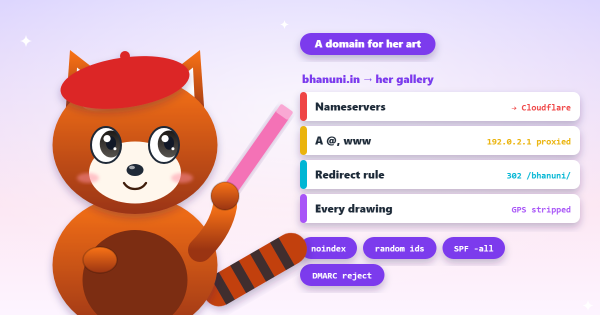
What happens. The counter lives on a new subdomain, but the domain it belongs to already had a rule that sends every visitor to the gallery (it’s a domain with no server of its own; more on that here). So when the page called the counter, it got the gallery page back instead of a number. The buttons stayed hidden, because the page shows them only when the counter answers properly.
Why. “Send every request to the gallery” meant every request, including ones for the new subdomain I had added months later, and that rule answered before the request ever reached my Worker.
Fix. I changed the rule to skip the counter’s address. It still didn’t work, but the answer was slightly different, which was the clue: the first rule was fixed, and a second, older rule I had forgotten was now the one catching it. Turning that one off finished the job.
Lesson. Before adding anything to a domain, list every rule that touches it, not only the one you remember. And when a fix changes the symptom without curing it, it has probably worked and uncovered the next problem.
3. The login asked for everything#
What happens. Wrangler, Cloudflare’s command-line tool, needs to log in to deploy the Worker and create the
database. wrangler login opens a browser page asking to allow a long list of permissions: DNS, account settings,
security, billing and more. For a heart counter that felt like far too much.
Why. The docs confirm it “uses all the available scopes by default”.
Fix. You can ask for less: wrangler login --scopes-list shows what each permission is for, and --scopes
picks only the ones you name. Or skip the login and use an API token that can only touch Workers and D1. I took the
default this time; next time I’ll use the narrow token.
4. A setting landed in the wrong section#
What happens. The address of the counter is one line in Hugo’s settings file, params.toml. I added it, built
the site, and no post showed any buttons. There were no errors.
Why. A TOML file is divided into sections that start with a header like [article] or [homepage]. The
TOML spec says that after a header, “until the next header or EOF, are the
key/values of that table”. I had put my line just above [article], which looked like the top of the file, but
it was really at the end of the [homepage] section above it. Hugo read it as a homepage setting, so the post
template never saw it.
Fix. hugo config prints the settings as Hugo understands them, and searching that output showed where the
line had really gone. It now sits above the first header, where top-level settings belong.
5. A cache file slipped into a commit#
What happens. Wrangler keeps a hidden .wrangler/ folder next to the project, with details of the Cloudflare
account it last used. When I committed the Worker, I added its whole folder, and the hidden folder went with it
into a public repository.
Why. The folder was new, so nothing told git to leave that file out.
Fix. A follow-up commit removed the file and added a .gitignore for the folder. My rule from now on: a new
tool folder gets its .gitignore before the first git add, and I read git status before committing.
Checking it from outside#
These work from any machine, and show the counter is up, refuses other sites and refuses made-up posts:
curl -s https://hearts.bhanuni.in/reactions/cloudflare-1-an-introduction
# {"like":0,"dislike":0,"heart":0}

curl -s -X POST -H "Origin: https://example.com" \
  https://hearts.bhanuni.in/reactions/cloudflare-1-an-introduction/like
# {"error":"origin"}

curl -s -X POST -H "Origin: https://samarthya.me" \
  https://hearts.bhanuni.in/reactions/no-such-post/like
# {"error":"unknown post"}
And the owner’s view, from the Worker’s folder:
npx wrangler d1 execute bhanuni-hearts --remote \
--command "SELECT * FROM reactions ORDER BY n DESC LIMIT 10"Takeaways#
- A static site can still be interactive: keep the pages static and put one tiny counter beside them.
- Decide what not to store first. With only a count per post, there is nothing personal to protect or leak.
- Without logins you can’t stop every abuser, but you can make junk useless: check the origin, accept only things that exist on the live site, and keep a reset command handy.
- Test against production’s real output; minifiers, redirects and config files all change what you think you shipped.
- Give a tool’s folder its
.gitignorebefore the first commit, and give a CLI the fewest scopes it needs.
References#
- What is GitHub Pages?: GitHub Docs, static hosting
- Limits: Cloudflare Workers docs, 100,000 requests a day and 10 ms CPU on the free plan
- D1 pricing and D1 limits: Cloudflare docs, free daily reads, writes and storage
- Cloudflare D1: Cloudflare docs, what D1 is
- Custom Domains: Cloudflare Workers docs, automatic DNS records and certificates
- Wrangler general commands: Cloudflare docs,
wrangler loginscopes - Wrangler configuration: Cloudflare docs,
workers_devand routes - UPSERT and RETURNING: SQLite docs, the counting statement and versions
- Cross-Origin Resource Sharing (CORS): MDN,
Access-Control-Allow-Originand simple requests - Window: localStorage: MDN, per-origin storage and its exceptions
- Partials: comments: Blowfish docs,
comments.htmlandshowComments - TOML v1.0.0: Table: TOML spec, which keys belong to which section
- giscus and utterances: the GitHub-based comment widgets I compared