I am learning which free tools can carry real weight in a secure development life cycle. This short series is my proof of concept with OSV: the database, the scanner and its fix command. I run everything for real and keep the output. This part is about the concept and the website.
The problem OSV solves#
Say your project uses minimist 1.2.5. Is it vulnerable? With a CVE record alone you have to map a product name
to your package and read the affected versions from prose. OSV’s own FAQ says the older way of doing this (CPEs)
makes it “difficult to do in an automated way” (OSV FAQ).
OSV fixes this with three pieces:
| Piece | What it is |
|---|---|
| OSV schema | A JSON format where affected versions are written in the package ecosystem’s own terms |
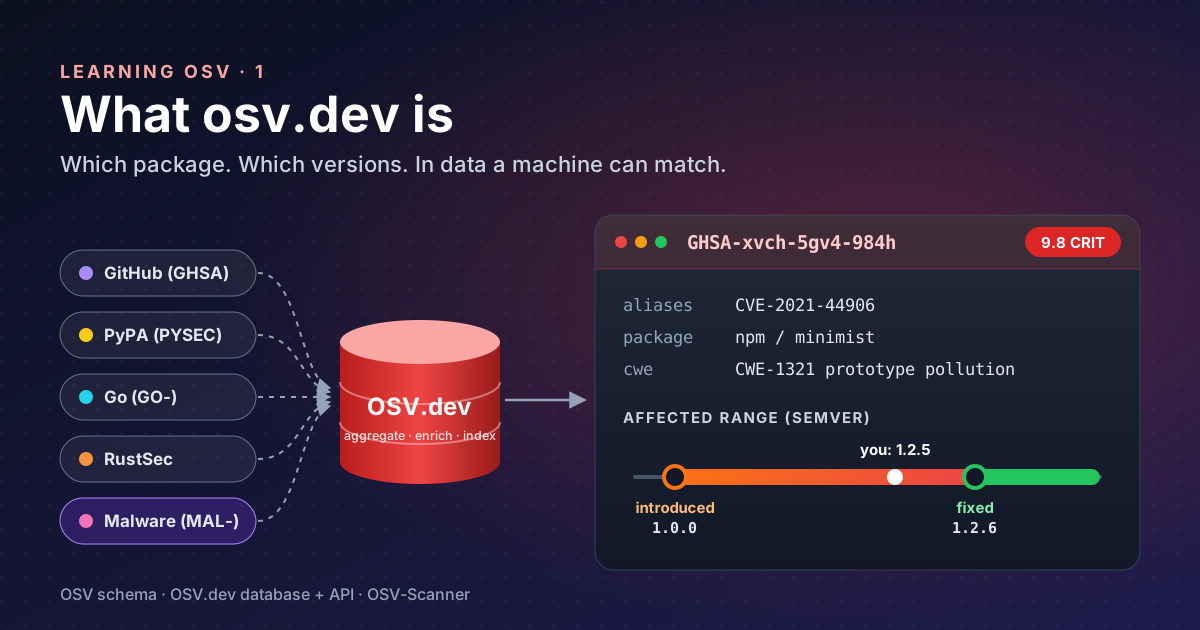
| OSV.dev | A database and API that “aggregates, enriches and indexes” advisories from sources such as GitHub Security Advisories, PyPA and RustSec |
| OSV-Scanner | The official command-line front end: reads your lockfiles and asks OSV.dev what is affected |
The key idea is precision. A record does not say “lodash before 4.17.21 is bad” in a sentence; it says it in data that a scanner can compare with your lockfile.
Navigating osv.dev#
The list (osv.dev/list) has a search box and an ecosystem filter. The ecosystems go well beyond language packages: npm, PyPI, Maven, Go, crates.io and NuGet, but also Debian, Ubuntu, Alpine, Red Hat, GitHub Actions and even VS Code extensions. Each row shows the ID, the packages, a summary, when it was published, and whether a fix exists.
The ID prefix tells you where a record came from. A few you will meet often:
| Prefix | Source |
|---|---|
GHSA- | GitHub Security Advisories |
PYSEC- | Python Packaging Authority |
GO- | Go vulnerability database |
RUSTSEC- | Rust advisory database |
MAL- | Malicious packages, not bugs: code published to steal or attack |
That last one surprised me. Scrolling the list on a normal morning shows MAL- records published hours earlier:
packages that are malware by design. A scanner that knows about them catches something no CVE ever will.
Reading a record#
Open a record, for example
GHSA-xvch-5gv4-984h, prototype pollution in minimist. The page
reads top to bottom:
- Aliases: the same issue elsewhere. Here,
CVE-2021-44906. This is how you join OSV with CVE-based tools. - Published / Modified: published March 2022, modified as recently as March 2026. Records keep improving.
- Severity:
9.8 (Critical)with the CVSS vector. - Details and Database specific: the description, the CWE (
CWE-1321), and whether GitHub reviewed it. - References: advisory, fix commits, issues.
- Affected packages: the part that matters. For
npm / minimistit lists ranges: introduced1.0.0, fixed1.2.6; and separately introduced0, fixed0.2.4.
So 1.2.5 is affected, 1.2.6 is not, and the upgrade path is one patch version. No reading between the lines.
The JSON Data link shows the raw record. Its fields follow the
OSV schema: id, aliases, severity, affected[].ranges[].events
(introduced, fixed, last_affected) and references.
The one API call worth knowing#
Ask OSV.dev directly whether one package version is affected:
curl -s -X POST https://api.osv.dev/v1/query \
  -d '{"package":{"name":"minimist","ecosystem":"npm"},"version":"1.2.5"}'
The answer (trimmed) names the record and its CVE alias:
GHSA-xvch-5gv4-984h aliases: CVE-2021-44906 Prototype Pollution in minimistGET https://api.osv.dev/v1/vulns/<ID> returns one full record. That is enough to script small checks, but for a
whole project the scanner in part 2 does the
work.
What I took from this part#
- OSV answers which package, which versions, in data, which is what automation needs.
- The ID prefix tells you the source;
MAL-means malware, a class of risk CVEs do not cover. - On a record, go straight to Affected packages and the fixed event: that is your upgrade target.
- Aliases connect OSV to the CVE world.
References#
- OSV FAQ: OSV.dev, the three parts of OSV, aggregation and enrichment, the CPE matching problem
- OSV schema: OpenSSF repository, record fields and range events
- OSV.dev vulnerability list: ecosystems, search, list columns,
MAL-records - GHSA-xvch-5gv4-984h: OSV.dev, the example record and its page layout
- OSV API: query: OSV.dev, request format used above
Next: part 2, scanning a project.