The first three parts were about public websites: the front desk, what it did for my domains and the free-tier checklist. This one is about the things that should not be public: an admin page, a home dashboard, a family photo area. It’s also the part I haven’t built yet, so it ends with a plan rather than a trophy.
Words used in this post#
| Term | Meaning here |
|---|---|
| Perimeter | The boundary of a network (the castle wall): firewall, VPN |
| Identity provider (IdP) | The service that proves who you are: Google, GitHub, Microsoft, or a code sent by email |
| Policy | A rule saying who may reach what, under which conditions |
| Least privilege | Give each person access to what they need, and nothing else |
| ZTNA | Zero trust network access: reaching an app through an identity check instead of a VPN |
| Tunnel | An encrypted connection that your server opens outwards to Cloudflare, so nothing needs to connect in |
| One-time PIN (OTP) | A short code emailed to you at login; proving you own the mailbox proves who you are |
What zero trust actually means#
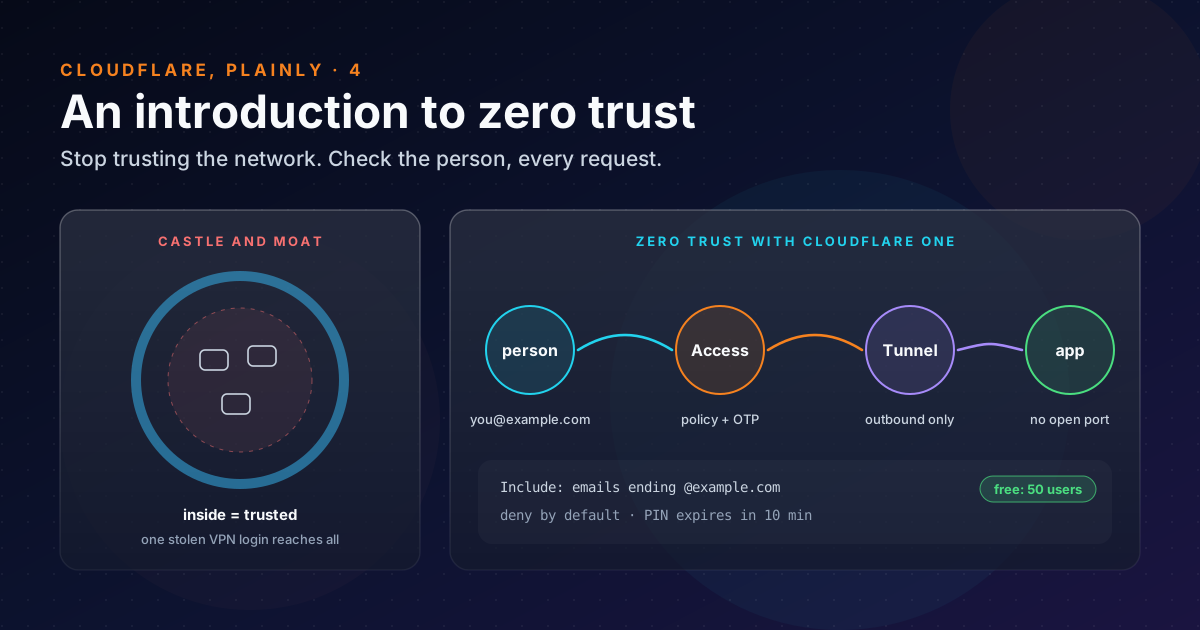
The standard reference is NIST’s SP 800-207, Zero Trust Architecture. Its abstract describes zero trust as moving defences “from static, network-based perimeters to focus on users, assets, and resources”, and states the core idea in one line: there is “no implicit trust granted to assets or user accounts based solely on their physical or network location”.
In practice, that comes down to three habits:
- Check every request, not just the first. A login gives you a short-lived session, not a permanent pass.
- Check the person, not the network. Being on the office Wi-Fi or the VPN proves nothing by itself.
- Give the least access that works. Reaching the wiki doesn’t mean reaching the database.
| Castle and moat | Zero trust | |
|---|---|---|
| Trust is based on | Where you connect from | Who you are, on which device, right now |
| A stolen login opens | The whole network | One app, until the session expires |
| Apps are reachable | By anyone inside | Only through the identity check |
| Typical tool | VPN | An identity-aware proxy in front of each app |
Zero trust isn’t a product you buy. It’s a way of designing access. Products only make it easier.
How Cloudflare does it#
Cloudflare’s version is called Cloudflare One. For a small setup, two pieces matter:
- Access sits in front of an app and asks for identity first. It’s deny by default: anyone who doesn’t match an Allow policy is blocked, whether or not a Block policy names them.
- Tunnel connects the app’s machine to Cloudflare. A small program,
cloudflared, makes outbound-only connections to the nearest Cloudflare data centre, so you can close every inbound port on the firewall. The server doesn’t need a public address at all.
Put the two together and an app has no open port to scan and no login page anyone can reach. The only way in is through Cloudflare, after a policy says yes.
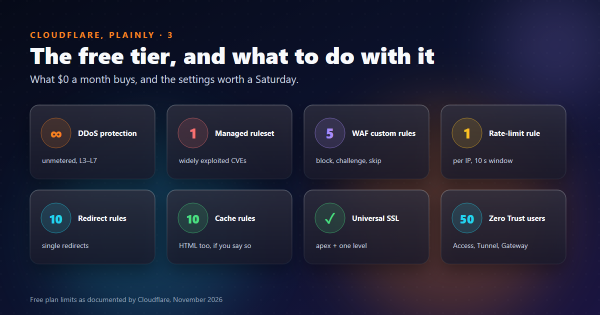
The free plan covers up to 50 users, with logs kept for up to 24 hours. That’s far more than a household needs.
Policies, plainly#
An Access policy has an action (Allow, Block, Bypass or Service Auth) and rules that combine like logic:
| Rule | Works like | Example |
|---|---|---|
| Include | OR: any one is enough | emails ending in @example.com, or friend@example.org |
| Require | AND: all must hold | and the person is in the group family |
| Exclude | NOT: any one blocks | but not old-laptop@example.com |
Two warnings from the documentation are worth repeating. Bypass “does not enforce any Access security controls”, so don’t use it as a shortcut for internal apps. And an Include rule of “login method: one-time PIN” lets in anyone with a working email address. Name the people instead.
What logging in looks like#
With one-time PIN login, you don’t need Google or GitHub set up at all:
- You open the app’s address and Cloudflare shows its login page.
- You type your email. If a policy allows that address, a code arrives. The page says “A code has been emailed to you” either way, so nobody can use it to test which addresses are allowed.
- You enter the code. It’s single-use and expires 10 minutes after it was requested.
A worked example: a private app with no open port#
Here’s the shape of it, for a small web app running on a home machine at localhost:8000. The commands are
cloudflared’s locally managed tunnel
steps; names are placeholders.
cloudflared tunnel login                 # opens a browser; pick the zone
cloudflared tunnel create home-app       # prints a tunnel UUID and writes a credentials file
cloudflared tunnel route dns home-app app.example.com   # CNAME → <UUID>.cfargotunnel.com
# ~/.cloudflared/config.yml
tunnel: <Tunnel-UUID>
credentials-file: /home/user1/.cloudflared/<Tunnel-UUID>.json
ingress:
- hostname: app.example.com
service: http://localhost:8000
- service: http_status:404 # the required catch-all: anything else gets a 404cloudflared tunnel run home-appAt this point the app is reachable from the internet, but not yet protected. Before sharing the address, add
an Access application for app.example.com in the Zero Trust dashboard, with one Allow policy:
Application:  app.example.com (self-hosted)
Policy:       Family   (Allow)
  Include:    Emails   you@example.com, partner@example.com
Login:        One-time PIN
Session:      24 hours
Then check it from a private window: you should get Cloudflare’s login page, not the app. And from outside your network, the machine itself should have no open port to find.
Where I’d use it#
I haven’t set any of this up yet. In the bhanuni.in post I noted that a family-only area for photos and videos doesn’t belong in a public repository. It should be a private site behind Access. That’s the first job. The second is the old habit of opening a port “just for a weekend” to reach something at home. With a tunnel there’s no port to forget to close.
What I’ll be careful about:
- The identity is now the key. If someone takes over the email account, the PIN goes to them. Protect those mailboxes with 2FA.
- Cloudflare becomes the gate. If the account is compromised, so is every app behind it. That’s part 3, step 1, again.
- Keep
cloudflaredupdated, like any other software with a connection to the internet.
Takeaways#
- Zero trust means no trust from location: check the person and the device on every request, and give the least access that works.
- Cloudflare Access puts an identity check in front of an app, and it’s deny by default.
- Cloudflare Tunnel connects a server outwards, so the app needs no open port and no public address.
- One-time PIN login needs no identity provider. Name the people in the policy; never allow “anyone with an email”.
- The free plan covers 50 users, plenty for a family or a small team.
References#
- SP 800-207, Zero Trust Architecture: NIST, the definition and the “no implicit trust” principle
- Cloudflare One: Cloudflare docs, the platform and its components
- Access policies: Cloudflare docs, actions, Include/Require/Exclude, deny by default, the Bypass and OTP warnings
- Cloudflare Tunnel: Cloudflare docs, outbound-only connections and
cloudflared - Create a locally managed tunnel: Cloudflare docs, the
cloudflared tunnelcommands andconfig.yml - Tunnel configuration file: Cloudflare docs, ingress rules and the required catch-all
- One-time PIN login: Cloudflare docs, how the emailed code works and expires
- SASE and Zero Trust plans: Cloudflare, the free plan’s 50 users and 24-hour log retention
That’s the series. The next post on the shelf, when I’ve built it, will be the private family area behind Access.