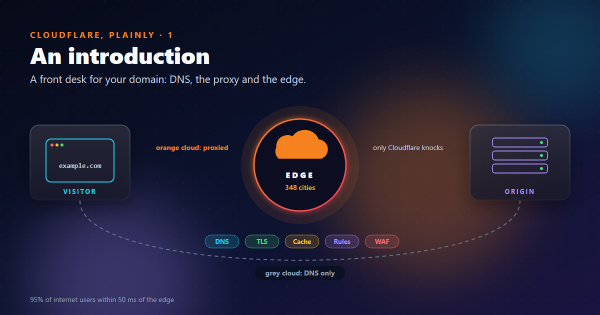
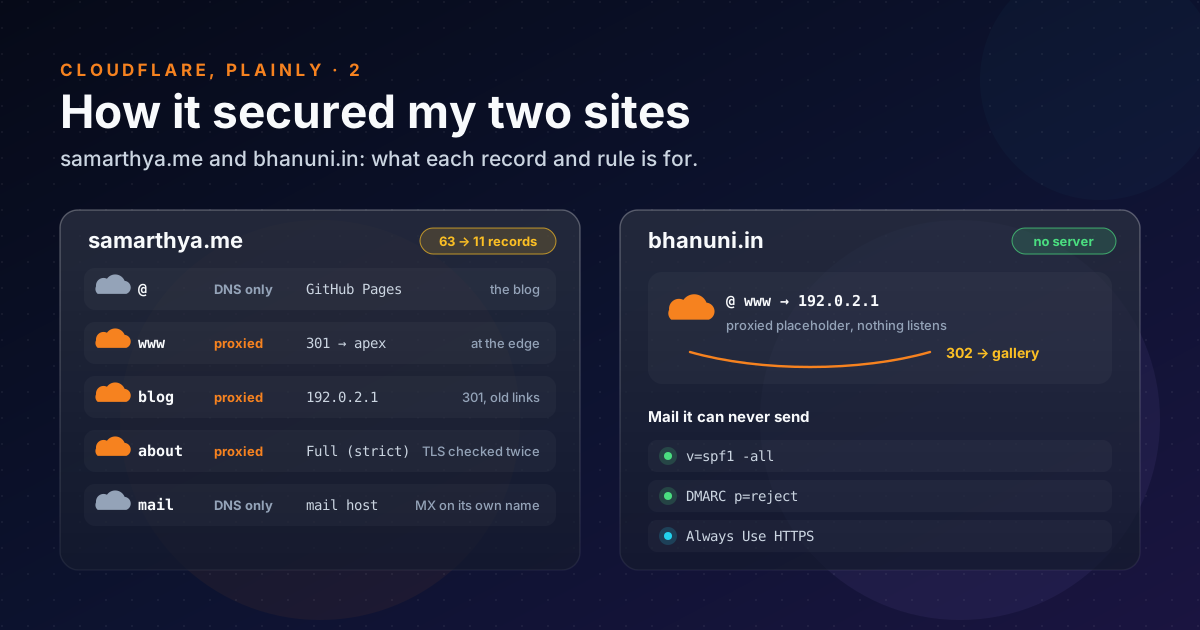
Part 1 covered the front desk in general. This post is about my own front desks. Earlier posts have the click-by-click detail; here I’m looking at what each step protects against.
Words used in this post#
| Term | Meaning here |
|---|---|
| Zone | All the DNS records of one domain, as Cloudflare manages them |
| Attack surface | Everything an attacker could try: names, open ports, forgotten pages |
| Full (strict) | Cloudflare connects to the origin over HTTPS and checks its certificate |
| 301 / 302 | Redirects: moved permanently and found elsewhere for now |
| SPF, DMARC | DNS records telling mail servers who may send mail for a domain, and what to do with fakes |
| Placeholder address | 192.0.2.1, from a block reserved for documentation; nothing answers on it |
The starting point#
In October the whole domain lived at one shared host: website, mail and DNS. The website was a six-year-old WordPress install, and someone had planted files in it. The decision in Rebuilding was:
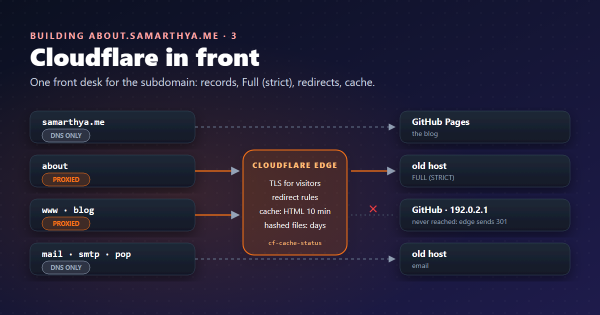
- the blog becomes static on GitHub Pages: nothing to log in to, no plugins, no database;
- the old host keeps only mail and one static subdomain;
- Cloudflare takes over DNS and, where it helps, stands in front.
Risk by risk#
| Risk | What I did in Cloudflare | Where |
|---|---|---|
| Forgotten names pointing at the old server | Rebuilt the zone from scratch: 63 records became 11 | Rebuilding 4 |
| Moving the site breaks mail | Mail got its own name (MX → mail.), DNS only | Rebuilding 4 |
| Six years of old links hitting the old server | The old blog name is proxied to the placeholder and answered with a 301 at the edge | About 3 |
www sent through to GitHub only to bounce back | A redirect rule answers it at the edge | About 3 |
| A site on a host I don’t trust | about is proxied with Full (strict) TLS and cached | About 3 |
| Anyone can claim my domain on GitHub Pages | The domain is verified with GitHub (one TXT record) | Rebuilding 4 |
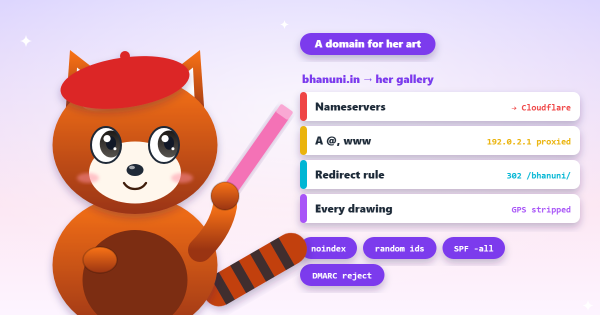
| A spare domain used to fake email | bhanuni.in says “no mail, ever”: v=spf1 -all, DMARC p=reject | bhanuni.in |
| A new domain needing a new server | bhanuni.in has no server: two proxied placeholders and one 302 rule | bhanuni.in |
A few of these are worth a closer look.
The cheapest security work: deleting records#
The old DNS panel had 63 records. Most were things the hosting panel had made for itself, one-time certificate tokens, and subdomains nobody had used in years. Each one is a name that still answers. A forgotten subdomain that points at an old server is exactly the kind of door you don’t know you left open.
I copied over only the 11 records I could explain. Everything else stopped existing when the nameservers changed. No other step removed as much attack surface for as little work.
Redirects that never touch a server#
The old blog.samarthya.me name gets the most traffic from bots and old bookmarks. It points at 192.0.2.1,
an address nothing listens on, with the orange cloud on. Every request lands at Cloudflare, a redirect rule
answers it with a 301 to the same path on the new site, and no server anywhere sees it:
curl -sI "https://blog.samarthya.me/wps/x/?a=1" | grep -i "^HTTP\|^location\|^server"
# HTTP/1.1 301 Moved Permanently
# Location: https://samarthya.me/wps/x/?a=1
# Server: cloudflare
bhanuni.in uses the same trick for the whole domain: a 302 to the gallery, and no machine to patch.
Strict TLS to a host I don’t trust#
about.samarthya.me is the only thing still served from the old host. It’s proxied, so visitors get Cloudflare’s
certificate, and Cloudflare connects onwards with
Full (strict): HTTPS to the origin, and the
certificate must be valid for the name. The looser modes (Flexible, plain HTTP to the origin, or Full, any
certificate) would have hidden a real mistake I made: for a day, the origin served the host’s default
certificate. Strict mode turns that kind of slip into an error you can see.
The origin’s certificate comes from Let’s Encrypt over HTTP-01, not DNS-01, so no Cloudflare API token ever sits on that server.
The blog itself stays grey#
The blog at samarthya.me is DNS only. GitHub Pages serves it, has its own CDN, and renews its own certificate.
Putting Cloudflare’s proxy in front would add rules I don’t need, and it can
get in the way of GitHub’s certificate renewal. A static
site with nothing to log in to is already a small target. Not everything needs the orange cloud.
What it looks like from outside today#
for h in samarthya.me www.samarthya.me about.samarthya.me blog.samarthya.me bhanuni.in; do
  printf "%-20s " "$h"; curl -sI "https://$h/" | grep -i "^HTTP\|^server" | tr -d '\r' | paste -sd' '
done| Name | Status | Answered by |
|---|---|---|
samarthya.me | 200 | GitHub.com |
www.samarthya.me | 301 | cloudflare |
about.samarthya.me | 200 | cloudflare |
blog.samarthya.me | 301 | cloudflare |
bhanuni.in | 302 | cloudflare |
What’s still open#
Being honest about the trophy shelf means listing the empty spots too. I looked these up while writing:
- DNSSEC is off on both domains. No DS record at either registry. DNSSEC signs the zone’s answers so nobody can forge them on the way. Turning it on is one click in Cloudflare plus one record at the registrar (part 3).
- samarthya.me’s DMARC is still
p=noneand its SPF ends in~all(softfail). That’s the “watching” stage: reports come in, but fake mail isn’t rejected. Once the reports show only the real mail server sending, it should becomep=quarantine, thenp=reject. - No HSTS yet. Browsers aren’t told to insist on HTTPS. It’s easy to switch on and hard to undo (part 3), so I’m leaving it until everything that’s proxied has a working certificate for good.
- No WAF rules of my own. Cloudflare already sees and blocks a lot without being asked (About 4). I want a few weeks of data before I write rules.
Takeaways#
- The biggest security gain was the least exciting: rebuilding the zone with only the records I could explain.
- A proxied placeholder plus a redirect rule gives a name that works for visitors and has no server to attack.
- Use Full (strict) wherever Cloudflare talks to an origin. The other modes hide the mistakes you most need to see.
- Leave names DNS only when the host already does TLS and caching well. The orange cloud is a tool, not a badge.
- Write down what’s still open. DNSSEC, DMARC enforcement and HSTS are my next three.
References#
- Encryption modes: Cloudflare docs, Off, Flexible, Full and Full (strict)
- Proxy status: Cloudflare docs, what proxied and DNS-only answers return
- Redirect one domain to another: Cloudflare docs, the proxied placeholder and redirect-rule pattern
- DNSSEC: Cloudflare docs, what it does and how to switch it on
- RFC 5737: IPv4 address blocks reserved for documentation: IETF, the
192.0.2.0/24placeholder block - RFC 7489: DMARC: IETF, the
p=none,quarantineandrejectpolicies - Protect domains that don’t send email: GOV.UK, the SPF and DMARC records for a domain with no mail
Next: part 3, the free tier, and a checklist for your own domain.