A common use-case for cert-manager is requesting TLS signed certificates to secure your ingress resources.
cert-manager adds certificates and certificate issuers as resource types in Kubernetes clusters, and simplifies the process of obtaining, renewing and using those certificates.Installation#
The easiest way is to use helm charts.
helm repo add jetstack https://charts.jetstack.ioroot@master>helm repo list
NAME URL
stable https://charts.helm.sh/stable
jetstack https://charts.jetstack.iohelm install cert-manager jetstack/cert-manager \
--namespace cert-manager \
--create-namespace \
--version v1.7.1 \
--set prometheus.enabled=false \
--set webhook.timeoutSeconds=4 \
--set installCRDs=trueOnce deployed you can see the k8s objects deployed
root@master>k get all -n cert-managerNAME READY STATUS RESTARTS AGE
pod/cert-manager-86f4f985d6-ntgtf 1/1 Running 0 7d23h
pod/cert-manager-cainjector-56bc5f744c-tdhx6 1/1 Running 0 7d23h
pod/cert-manager-webhook-997b5dd88-4jbmf 1/1 Running 0 7d23h
NAME TYPE CLUSTER-IP EXTERNAL-IP PORT(S) AGE
service/cert-manager ClusterIP 10.100.35.73 <none> 9402/TCP 67d
service/cert-manager-webhook ClusterIP 10.96.67.112 <none> 443/TCP 67d
NAME READY UP-TO-DATE AVAILABLE AGE
deployment.apps/cert-manager 1/1 1 1 67d
deployment.apps/cert-manager-cainjector 1/1 1 1 67d
deployment.apps/cert-manager-webhook 1/1 1 1 67d
NAME DESIRED CURRENT READY AGE
replicaset.apps/cert-manager-57d89b9548 0 0 0 67d
replicaset.apps/cert-manager-86f4f985d6 1 1 1 7d23h
replicaset.apps/cert-manager-cainjector-56bc5f744c 1 1 1 7d23h
replicaset.apps/cert-manager-cainjector-5bcf77b697 0 0 0 67d
replicaset.apps/cert-manager-webhook-997b5dd88 1 1 1 7d23h
replicaset.apps/cert-manager-webhook-9cb88bd6d 0 0 0 67dExample#
>kubectl get Issuers,ClusterIssuers,Certificates,CertificateRequests,Orders,Challenges -AIssuers#
NAMESPACE           NAME                                          READY   AGE
cert-manager-test   issuer.cert-manager.io/test-selfsigned        True    7d21h
jenkins             issuer.cert-manager.io/jenkins-selfsigned     True    6d18h
spinnaker           issuer.cert-manager.io/spinnaker-selfsigned   True    7d21h
NAMESPACE NAME READY SECRET AGE
cert-manager-test certificate.cert-manager.io/selfsigned-cert True selfsigned-cert-tls 7d21h
jenkins certificate.cert-manager.io/jenkinsdevops.com True jenkinsdevops.com 6d18h
spinnaker certificate.cert-manager.io/devops.com True devops.com 7d19h
spinnaker certificate.cert-manager.io/selfsigned-cert True devops.com 7d21hNAMESPACE NAME APPROVED DENIED READY ISSUER REQUESTOR AGE
cert-manager-test certificaterequest.cert-manager.io/selfsigned-cert-hnd85 True True test-selfsigned system:serviceaccount:cert-manager:cert-manager 7d21h
jenkins certificaterequest.cert-manager.io/jenkinsdevops.com-75hdn True True jenkins-selfsigned system:serviceaccount:cert-manager:cert-manager 6d18h
spinnaker certificaterequest.cert-manager.io/devops.com-g6b2m True True spinnaker-selfsigned system:serviceaccount:cert-manager:cert-manager 5d22h
spinnaker certificaterequest.cert-manager.io/devops.com-rz6db True True spinnaker-selfsigned system:serviceaccount:cert-manager:cert-manager 5d23h
spinnaker certificaterequest.cert-manager.io/devops.com-wzs4h True True spinnaker-selfsigned system:serviceaccount:cert-manager:cert-manager 5d22h
spinnaker certificaterequest.cert-manager.io/selfsigned-cert-mfggn True True spinnaker-selfsigned system:serviceaccount:cert-manager:cert-manager 7d21hAfter Installation, Configure#
The first thing you’ll need to configure after you’ve installed cert-manager is an issuer which you can then use to issue certificates.
Before you begin#
Issuers & ClusterIssuer#
Issuers, and ClusterIssuers, are Kubernetes resources that represent certificate authorities (CAs) that are able to generate signed certificates by honoring certificate signing requests.
Example – Issuer#
apiVersion: cert-manager.io/v1
kind: Issuer
metadata:
  name: jenkins-selfsigned
  namespace: jenkins
spec:
  selfSigned: {}
Example – ClusterIssuer#
apiVersion: cert-manager.io/v1
kind: ClusterIssuer
metadata:
  name: selfsigned-cluster-issuer
spec:
selfSigned: {}Issuer is a namespaced resource, and it is not possible to issue certificates from an Issuer in a different namespace.If you want to create a single Issuer that can be consumed in multiple namespaces, you should consider creating a ClusterIssuer resource.
Certificate#
A Certificate is a namespaced resource that references an Issuer or ClusterIssuer that determine what will be honoring the certificate request.
When a Certificate is created, a corresponding CertificateRequest resource is created by cert-manager containing the encoded X.509 certificate request, Issuer reference, and other options based upon the specification of the Certificate resource.
Securing Ingress#
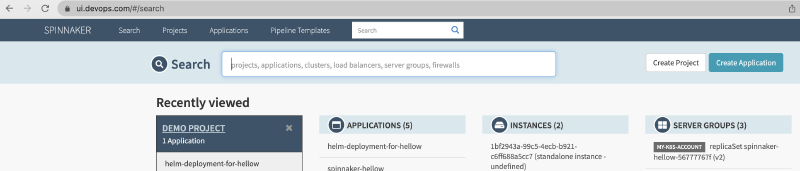
As I conclude the blog, let me use the deployed cert-manager to secure the TLS deployment for my spinnaker instance.
Supported Annotations in Ingress: https://cert-manager.io/docs/usage/ingress/#supported-annotations
In our example we will use mostly
cert-manager.io/issuercert-manager.io/cluster-issuer
Deployed Spinnaker Pods#
root@master>k get pods -n spinnaker
NAME                                  READY   STATUS    RESTARTS   AGE
minio-5bbd54df5b-qnfvs                1/1     Running   0          8d
spin-clouddriver-ddd75554c-tts9z      1/1     Running   0          45h
spin-deck-649d97f44f-kp59x            1/1     Running   0          8d
spin-echo-9587cdc9d-gm7pt             1/1     Running   0          4d16h
spin-front50-7dbbb7668-qpr5f          1/1     Running   0          5d23h
spin-gate-69b9f88748-pppwm            1/1     Running   0          5d23h
spin-igor-6bcc768f9c-fzr8c            1/1     Running   0          47h
spin-orca-68ff75b6f8-r6872            1/1     Running   0          5d23h
spin-redis-864dff6b7-82m55            1/1     Running   0          8d
spin-rosco-68dc887685-sm9p8 1/1 Running 0 5d23hServices#
root@master>k get svc -n spinnaker
NAME                  TYPE        CLUSTER-IP       EXTERNAL-IP   PORT(S)    AGE
minio                 ClusterIP   10.96.179.180    <none>        9000/TCP   8d
spin-clouddriver      ClusterIP   10.107.86.175    <none>        7002/TCP   8d
spin-deck             ClusterIP   10.106.159.232   <none>        9000/TCP   8d
spin-echo             ClusterIP   10.98.31.29      <none>        8089/TCP   8d
spin-front50          ClusterIP   10.106.148.148   <none>        8080/TCP   8d
spin-gate             ClusterIP   10.105.124.157   <none>        8084/TCP   8d
spin-igor             ClusterIP   10.99.29.79      <none>        8088/TCP   5d23h
spin-orca             ClusterIP   10.103.240.238   <none>        8083/TCP   8d
spin-redis            ClusterIP   10.99.134.213    <none>        6379/TCP   8d
spin-rosco            ClusterIP   10.110.22.96     <none>        8087/TCP   8d
I will use the Ingress to expose the UI and API
apiVersion: networking.k8s.io/v1
kind: Ingress
metadata:
  annotations:
    haproxy.org/cors-allow-origin: "*.devops.com"
    haproxy.org/ingress.class: haproxy
    cert-manager.io/issuer: "spinnaker-selfsigned"
    cert-manager.io/common-name: "devops.com"
  name: spinnaker-ingress
  namespace: spinnaker
spec:
  ingressClassName: haproxy
  rules:
  - host: ui.devops.com
    http:
      paths:
      - backend:
          service:
            name: spin-deck
            port:
              number: 9000
        path: /
        pathType: Prefix
  - host: api.devops.com
    http:
      paths:
      - backend:
          service:
            name: spin-gate
            port:
              number: 8084
        path: /
        pathType: Prefix
  tls:
  - hosts:
    - ui.devops.com
    - api.devops.com
    secretName: devops.com
Please note the annotation cert-manager.io/issuer: "spinnaker-selfsigned" applied to the ingress once the resource is created using kubectl create -f <yaml>
k get ing -n spinnaker
NAME                  CLASS     HOSTS                                                 ADDRESS          PORTS     AGE
spinnaker-ingress     haproxy   ui.devops.com,api.devops.com,clouddriver.devops.com   10.98.117.100    80, 443   7d21h