bhanuni.in, and then did nothing with it for almost six years. It sat in a drawer like a gift card. She now draws every day (digitally & otherwise) (ponies - MLP, Sprunki, Rat-A-Tat, Sab Jholmaal hai and weekend sessions as part of a group), so the domain finally has a job: it opens her gallery. This post is all about how I wired it up, why I picked the boring option, and the precautions I take before any of her pictures go online.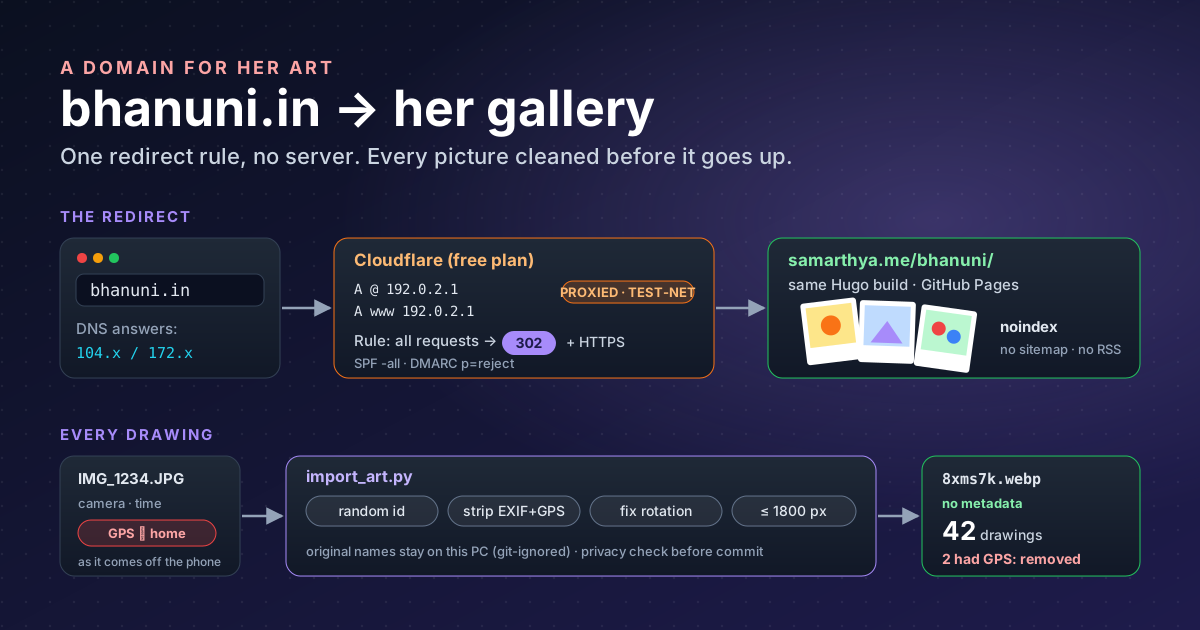
What I wanted#
Three things, in this order:
- Nothing new to look after. After the old blog was hacked, I do not want another server to patch.
- Her drawings, not her. A gallery that shows the work and gives away nothing about the child: no face, no school, no town, no birthday.
- Room to grow. If the gallery gets big, or she wants her own site one day, the domain should move without breaking a single link someone has shared.
Three options, one choice#
| Option | What it would take | Verdict |
|---|---|---|
| A static page on my old shared hosting | Upload HTML through the hosting panel | No. That account had files planted in its web folder before the WordPress break-in. It keeps email only. |
| Its own site on Cloudflare Pages | A new repository, its own build and theme | Later. Right for a big gallery or a family-only area; too much for 42 drawings. |
| Redirect to a page on samarthya.me | A Cloudflare zone, two DNS records, one rule | Yes. The gallery is just another page in the blog’s existing pipeline. |
The redirect wins because it adds no moving parts. The gallery lives at samarthya.me/bhanuni/, built by the same
Hugo build and served by the same GitHub Pages as every post here. bhanuni.in owns nothing except the decision
“send visitors over there”. If that decision changes, I change one rule.
Keep the domain where it is, or transfer it?#
The domain came with a “lifetime” deal from a reseller registrar. Moving it to another registrar would end free renewals, and it would buy me nothing: once DNS is on Cloudflare, the registrar’s only remaining job is to keep renewing. So the domain stays put, with a few precautions:
- Read the public record. RDAP, the structured successor to WHOIS, showed an expiry date (December 2027), so “lifetime” means the reseller renews it every year on my behalf. I have a reminder to check that it rolled over.
- Transfer lock on. The record shows
client transfer prohibited, which tells the registry to refuse transfers until I remove it. I keep the transfer (EPP) code somewhere safe in case I ever need to leave. - Contact email off the hosting mailbox. Whoever controls the registrant email can reset the registrar login and take the domain. Mine points at a mailbox the old host does not run.
- Check what is public. The record’s Organisation field showed part of a postal address. The panel would not let me clear it, so I raised a ticket. Look up your own domains; you may be surprised.
The steps#
1. Add the zone and move the nameservers#
I added bhanuni.in to Cloudflare on the free plan, deleted every record it had copied from the old DNS, and replaced the two nameservers at the registrar with the two Cloudflare assigned.
Then nothing worked for a while, and that is normal. Public resolvers had cached the old delegation and kept asking the old nameserver, which now answered REFUSED. Cloudflare marks a new zone Pending until it sees the change,
and a pending zone “cannot be used to proxy traffic”. “Check nameservers now” on the Overview page nudges it; it turned Active within the hour.
2. Two placeholder records, proxied#
A redirect needs a request to reach Cloudflare first, so the name has to resolve to something. Cloudflare’s own guide for redirecting one domain to another uses an address that never receives traffic:
| Type | Name | Content | Proxy |
|---|---|---|---|
| A | @ | 192.0.2.1 | Proxied |
| A | www | 192.0.2.1 | Proxied |
192.0.2.1 is in TEST-NET-1, a block reserved for documentation that “SHOULD NOT appear on the public Internet”. That is the point: no machine answers on it, and with the orange
cloud on it never has to.
The trap I hit: with the proxy off (grey cloud), Cloudflare
returns the record’s real address and steps out of the way. Browsers then try to reach 192.0.2.1 directly and time out. If a redirect “does nothing”, look up the name: a
proxied record returns Cloudflare’s own addresses (104.x, 172.x), never the placeholder.
3. The redirect rule#
Rules → Redirect Rules → Create rule:
- When: All incoming requests. This zone does nothing else, so there is nothing to filter.
- Then: type Static, URL
https://samarthya.me/bhanuni/, status 302, query string not preserved.
My first attempt used a custom filter on the hostname and never matched. These are the usual slips:
| Wrong | Right |
|---|---|
https://bhanuni.in | bhanuni.in; a hostname has no scheme |
bhanuni.in/ | no trailing slash |
And between the apex and www conditions | Or; one request cannot have two hostnames |
| Field URI Full | Field Hostname |
| Saved as draft | Deployed |
301 or 302? Cloudflare preselects 301. A 301 says the resource “has been assigned a new permanent URI”, and it is heuristically cacheable, so browsers may remember it for a long time. A 302 says the target is “temporarily under a different URI”. The gallery may move to its own site one day, so I want browsers to ask again each time. That makes it 302.
4. HTTPS and email#
- Always Use HTTPS (SSL/TLS → Edge Certificates) “redirects all your visitor requests from http to https”.
- Close the email door. The domain sends no mail, which makes it a tempting return address for spammers. Two TXT records from the UK government’s guidance on protecting domains that don’t send email tell receiving servers to reject anything claiming to be from it:
@        TXT   "v=spf1 -all"
_dmarc   TXT   "v=DMARC1; p=reject;"
The full guidance also adds sp=reject, an empty DKIM key and a null MX record; these two lines are the minimum.
What each part means is in Keywords: Email.
5. Verify from the outside#
# Does the name resolve to Cloudflare (not 192.0.2.1)?
curl -s "https://dns.google/resolve?name=bhanuni.in&type=A"

# Does every variant land on the gallery?
for u in https://bhanuni.in/ https://www.bhanuni.in/ http://bhanuni.in/; do
  curl -s -o /dev/null -w "$u -> %{http_code} %{redirect_url}\n" "$u"
done

# What does the public registry record say (nameservers, lock, expiry)?
curl -s https://rdap.org/domain/bhanuni.in
The first uses Google Public DNS’s JSON API, which is handy when your own network caches old answers.
What it buys me#
- One pipeline. Adding a drawing is a commit, exactly like a post. No second site, theme or deploy.
- Free. Cloudflare’s free plan, GitHub Pages, and a domain renewed by someone else.
- HTTPS everywhere without touching a certificate.
- No server to patch, and so nothing to compromise like last time.
- Easy to move. When the gallery outgrows the blog, I delete one rule and two placeholder records and connect
the domain to its new home. Shared links keep working, because people only ever had
bhanuni.in.
Before any picture goes online#
The redirect was the easy part. The care goes into the pictures.
What the page shows. First name only. Drawings, never photos of her or anyone else. No school, no places, no dates of birth. She says yes before a drawing goes up, and every caption is in her own words.
What search engines see. The page carries a
noindex tag, and Hugo’s
build options keep it out of the blog’s lists, RSS and
sitemap (list: never). It is a page you reach by being given the address, not by searching for her name.
What the files carry. This is the part people forget. A phone photo of a drawing carries EXIF metadata: camera, time and, often, GPS coordinates of where it was taken, which for a drawing on the kitchen table means home. Of 42 drawings, two iPhone photos had GPS in them. So nothing is published by hand. A small Python importer handles every file:
- Random names. Each file becomes
<6 random characters>.jpg, somy-daughter-at-school.jpgsays nothing. - Rotation fixed, then metadata dropped. Pillow’s
exif_transposeturns the picture the right way up and removes the orientation tag. The image is then saved without any EXIF at all: no GPS, no camera, no timestamps. - Flattened and resized. Transparent PNGs go onto white and the long edge is capped at 1800 px.
- Only small copies published.
publishResources: falsemeans Hugo publishes only the 600 px and 1600 px WebP copies the page uses, not the stored files. - The name list stays home. The file mapping each random id to its original name is git-ignored, so the original names never reach the public repository.
After the import I check that no published file still has metadata, and the blog’s privacy check scans the bundle for paths, addresses and names before anything is committed.
One honest caveat: the blog’s repository is public, so anything committed is public forever, even after deletion. For a family-only area (photos, videos), the right home is a private repository on Cloudflare Pages behind Cloudflare Access, not this one.
What the page collects: nothing. No comments, no forms, no sign-up. India’s data protection law requires a business handling a child’s personal data to get “verifiable consent of the parent” first. A parent sharing their own child’s drawings is the kind of “personal or domestic purpose” the Act leaves out, but the safest data is the data you never collect.
What she got#
Behind the domain is a gallery that is properly hers: a fan of polaroid favourites that shuffles, filters for her own characters and fan art, series such as Sprunki crew and Miraculous Ladybug, and her four-frame comic The Snack Table playing as a little film with camera moves and her lines as subtitles. Two short guides in the repository, one for publishing a new drawing and one for editing the gallery, mean that adding the next drawing is a five-minute job.
Takeaways#
- A redirect is a perfectly good website for a domain you are not ready to build on: two proxied placeholder records and one rule.
- Use 302 while the destination might move. A cached 301 is hard to take back.
- Grey cloud + placeholder IP = timeout. The proxy must be on for Cloudflare to answer.
- Look up your own domains with RDAP: lock status, expiry and the contact fields you thought were private.
- Strip metadata by machine, not by memory. Two of 42 photos would have published our location.
Keywords#
The terms used above, in plain words, in the order you meet them.
Domains and DNS#
| Term | What it means |
|---|---|
| Registry | The organisation that runs a whole ending such as .in and keeps the master list of who holds which name. |
| Registrar / reseller | The shop you rent a name from. A reseller sells a registrar’s service under its own brand. |
| DNS | The internet’s phone book: turns a name like bhanuni.in into the address of a machine. |
| Nameserver (NS) | The server that answers DNS questions for a domain. Changing nameservers at the registrar hands those answers to someone else (here, Cloudflare). |
| Delegation | The registry’s note saying “for this domain, ask these nameservers”. |
| Resolver | The DNS server your device asks (your ISP’s, 8.8.8.8, 1.1.1.1). It caches answers for a while, which is why changes take time to show. |
REFUSED | A nameserver’s reply meaning “I don’t serve this domain”. The old one said this after the move. |
| Zone | All the DNS records of one domain, as managed in Cloudflare. Pending means Cloudflare is waiting to see its nameservers in the delegation; Active means it has. |
Apex (@) and www | @ is the bare name (bhanuni.in); www is the separate name www.bhanuni.in. Each needs its own record. |
| A record | “This name lives at this IPv4 address.” |
| TXT record | A free-text record, used here to publish email rules. |
| Proxied (orange cloud) | Cloudflare answers with its own addresses and handles the visit itself, so rules such as redirects can run. DNS only (grey cloud) hands out the record’s real address and stays out of the way. |
TEST-NET-1 (192.0.2.0/24) | Addresses reserved for examples and documentation; nothing real answers on them. A safe placeholder behind a proxy. |
Registration data#
| Term | What it means |
|---|---|
| WHOIS | The old, plain-text way to look up who holds a domain. |
| RDAP | Its structured replacement (Registration Data Access Protocol): the same facts (holder, registrar, nameservers, status, expiry) as JSON. rdap.org finds the right server for any domain. |
| EPP | The protocol registrars use to talk to the registry. Its status codes show up in RDAP. |
clientTransferProhibited | A lock set by the registrar: the registry refuses any transfer until it is removed. |
| EPP / auth code | The secret you give a new registrar to prove a transfer is yours. |
Web#
| Term | What it means |
|---|---|
| Redirect rule | A Cloudflare rule that answers a visit with “go there instead” rather than a page. |
| 301 vs 302 | Both are redirects. 301 means moved permanently and browsers may remember it for a long time; 302 means found elsewhere for now, so the browser asks again next time. |
| Always Use HTTPS | Cloudflare sends any http:// visit to the https:// address, so the connection is encrypted. |
| DNS over HTTPS (DoH) | Asking a DNS question as an ordinary web request; handy for checking from outside your own network’s cache. |
curl | A command-line tool that makes web requests and shows what came back. |
Email#
A domain that sends no mail can still be spoofed: a spammer writes it in the From line. These records tell receiving mail servers what to do with such mail.
| Term | What it means |
|---|---|
SPF (v=spf1 …) | A TXT record listing which servers may send mail for the domain. ( Sender Policy Framework) |
-all | The last word of the SPF list: all matches every other sender and - means fail, an explicit “not authorised”. v=spf1 -all therefore reads “nobody may send mail as me”. (~all, softfail, is only a weak hint.) |
| DKIM | A signature a sending server adds to each message, checked against a public key in DNS. An empty key says “nothing I send is signed”. (DomainKeys Identified Mail) |
DMARC (_dmarc TXT) | Ties SPF and DKIM together and tells receivers what to do when both checks fail. (Domain-based Message Authentication Reporting and Conformance) |
p= | The DMARC policy: none (just watch), quarantine (treat as suspicious, e.g. spam folder) or reject (refuse it outright). p=reject is the strongest. |
sp= | The same policy for subdomains (anything.bhanuni.in). Without it, subdomains follow p=. |
rua= | Optional: an address that receives daily summary reports. Not used here. |
Null MX (MX 0 .) | A record saying “there exists no mail exchanger”, so senders give up at once instead of retrying for days. |
Pictures and privacy#
| Term | What it means |
|---|---|
| EXIF | Hidden data a camera writes into a photo: model, settings, date and time. |
| GPS tags | The part of EXIF holding latitude and longitude of where the photo was taken. |
| Orientation tag | An EXIF note saying “show this rotated”; drop it without rotating and the picture appears sideways. |
| WebP | A modern image format, smaller than JPEG for the same quality. |
noindex | A tag asking search engines not to list a page in results. |
| Sitemap / RSS | Lists a site publishes for search engines and feed readers. The gallery is left out of both. |
| DPDP Act | India’s Digital Personal Data Protection Act, 2023. It requires verifiable parental consent before a business processes a child’s personal data. |
References#
- Redirect one domain to another: Cloudflare docs; the proxied
192.0.2.1records and redirect-rule setup - Zone status: Cloudflare docs; what Pending and Active mean, and that pending zones cannot proxy
- Proxy status: Cloudflare docs; DNS-only versus proxied answers
- Single redirects: settings: Cloudflare docs; available status codes and the 301 default
- Always Use HTTPS: Cloudflare docs; the HTTP to HTTPS redirect
- RFC 5737: IPv4 Address Blocks Reserved for Documentation: IETF; TEST-NET-1 (
192.0.2.0/24) - RFC 9110: HTTP Semantics, sections 15.4.2 and 15.4.3: IETF; 301 versus 302 and caching of 301
- Protect domains that don’t send email: GOV.UK; SPF
-all, DMARCp=rejectand the full record set - RFC 7208: Sender Policy Framework (SPF): IETF; the
allmechanism and the fail and softfail qualifiers - RFC 7489: DMARC: IETF; the
p=,sp=andrua=tags - RFC 7505: A “Null MX” No Service Resource Record: IETF; the
MX 0 .record for domains that accept no mail - EPP status codes: ICANN; meaning of
clientTransferProhibited - RDAP: ICANN; the registration-data protocol that replaces WHOIS
- JSON API for DNS over HTTPS: Google Public DNS; the lookup used for verification
- Block search indexing with noindex: Google Search Central; how
noindexworks and why the page must stay crawlable - Build options: Hugo docs;
list: neverandpublishResources: false - ImageOps.exif_transpose: Pillow docs; fixing rotation before the metadata is dropped
- DPDP Act 2023, section 9 and section 3: text of India’s Digital Personal Data Protection Act (unofficial reproduction); children’s data and the personal-purpose exemption
Related: moving samarthya.me’s domain without losing mail and putting Cloudflare in front of about.samarthya.me.