Ansible is a powerful automation tool that can be used to manage the configuration and deployment of a large number of systems. It has a rich library of modules that can be used to perform a variety of tasks, from managing files and packages to deploying applications and configuring network devices.
One of the key features of Ansible is its support for asynchronous tasks, which allows long-running tasks to be executed in the background while other tasks are performed. This can be useful for tasks such as deploying large applications or running complex system checks.
In this blog post, we’ll look at how to write an Ansible module from scratch that can be used to poll an async task with polling enabled and print a custom message every time polling is done.
Understanding Async#
Before we dive into writing our custom Ansible module, let’s take a quick look at how async tasks work in Ansible.
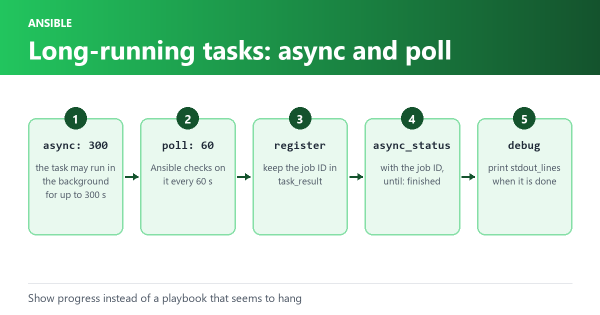
An async task is a long-running task that is executed asynchronously in the background while other tasks are performed. To execute an async task in Ansible, you can use the async keyword in your playbook. Here’s an example:
- name: Run long task asynchronously
  command: long_task.sh
  async: 3600
  poll: 0
In this example, the command module is used to execute a long-running task called long_task.sh. The async keyword is set to 3600, which means that the task will run in the background for up to one hour (3600 seconds). The poll keyword is set to 0, which means that Ansible will not poll the task status and will only return when the task has completed.
To check the status of an async task, you can use the async_status module in Ansible. Here’s an example:
- name: Check async task status
  async_status:
    jid: "{{ ansible_job_id }}"
In this example, the async_status module is used to check the status of an async task identified by its job ID (jid). The job ID is passed to the module using the ansible_job_id variable, which is automatically set by Ansible.
Writing a new module#
Now that we understand how async tasks work in Ansible, let’s look at how to write a custom Ansible module that can be used to poll an async task with polling enabled and print a custom message every time polling is done.
To write a custom Ansible module, we’ll need to create a new Python script in the library directory of our Ansible playbook. Let’s call our script custom_async_poll.
The first thing we need to do in our module is import the required Ansible modules:
#!/usr/bin/python

from ansible.module_utils.basic import AnsibleModule
from ansible.module_utils.six.moves import queue
from ansible.module_utils._text import to_bytes, to_text
We’ll also need to import the queue module from the six library, which is used to manage the polling queue.
Next, let’s define a function called async_poll that will be used to poll the async task status. Here’s the code:
def async_poll(module, jid, msg):
    # The number of times we should poll before giving up
    max_retries = 10

    # Initialize the poll queue with the current job ID
    poll_queue = queue.Queue()
    poll_queue.put(jid)

    # Poll the async task status
    while not poll_queue.empty() and max_retries > 0:
        jids = list(poll_queue.queue)
        results = module.run_command(['async_status'] + jids)
        for jid, result in zip(jids, results['stdout_lines']):
            data = module.from_json(to_text(result))
            if data['finished']:
                poll_queue.get()
                return data['data']
            else:
                poll_queue.put(jid)
                module.debug(msg)

        max_retries -= 1

    return None