The first four parts of this series explained what is inside a model: the maths, the probability, the hardware and the frontier. This last part is about using one. Each step below follows from something earlier in the series, and I link back where it does.
My running example is one I actually need: sorting a platform team’s support tickets into kubernetes, kafka, elastic, security or other.
1. Decide what “good” means, and test it#
Anthropic’s own prompt engineering guide starts before any prompt. It assumes you already have “a clear definition of the success criteria for your use case” and “some ways to empirically test against those criteria”. Without them, every change is a guess.
A test set does not need to be big to be useful. A few dozen real examples with the answer you expect, and a script that scores them, already beats intuition. Here is the shape, with a keyword rule standing in for the model so it runs anywhere:
# A tiny evaluation harness: real questions, expected answers, one score.
# Swap `classify` for a call to any model and compare models, prompts or effort levels on the same set.
TEST_SET = [
    ("Pods stuck in CrashLoopBackOff after the deploy", "kubernetes"),
    ("Kafka consumer lag keeps growing on topic orders", "kafka"),
    ("TLS certificate expires next week on the ingress", "security"),
    ("Elasticsearch cluster is yellow, one replica unassigned", "elastic"),
    ("Helm upgrade failed: another operation is in progress", "kubernetes"),
    ("Suspicious login from a new country on the admin account", "security"),
    ("Kibana dashboards time out since the upgrade", "elastic"),
    ("Deploy the new pricing page to production", "other"),
]

def classify(ticket: str) -> str:
    """Stand-in for a model call: a keyword rule, so the harness runs offline."""
    text = ticket.lower()
    for label, words in {"kubernetes": ["pod", "helm", "deploy"], "kafka": ["kafka", "consumer"],
                         "elastic": ["elasticsearch", "replica"], "security": ["tls", "login", "certificate"]}.items():
        if any(w in text for w in words):
            return label
    return "other"

def evaluate(fn) -> float:
    hits = 0
    for ticket, expected in TEST_SET:
        got = fn(ticket)
        hits += got == expected
        print(f"{'ok ' if got == expected else 'BAD'}  {expected:<10} <- {got:<10} {ticket}")
    return hits / len(TEST_SET)

print(f"accuracy: {evaluate(classify):.0%}")
ok kubernetes <- kubernetes Pods stuck in CrashLoopBackOff after the deploy
ok kafka <- kafka Kafka consumer lag keeps growing on topic orders
ok security <- security TLS certificate expires next week on the ingress
ok elastic <- elastic Elasticsearch cluster is yellow, one replica unassigned
ok kubernetes <- kubernetes Helm upgrade failed: another operation is in progress
ok security <- security Suspicious login from a new country on the admin account
BAD elastic <- other Kibana dashboards time out since the upgrade
BAD other <- kubernetes Deploy the new pricing page to production
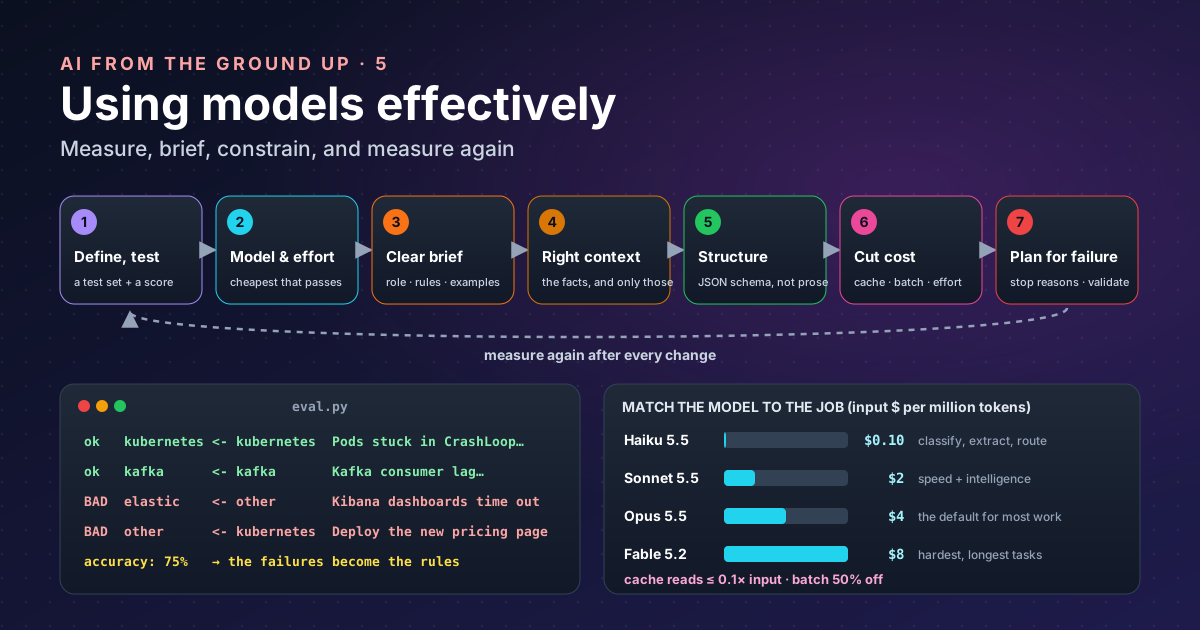
accuracy: 75%The two failures are the interesting ones: “Kibana” needs knowledge the rule lacks, and “deploy” is ambiguous. Those are exactly the cases a model should handle, and exactly the ones to keep in the test set. Part 2’s lesson applies to scores too: 75% on 8 questions is a weak claim; collect more before trusting a decision.
2. Pick the model, and the effort, for the job#
Models come in tiers. Anthropic’s current model overview is a good example of how providers describe them:
| Model | Described as | Price (input / output per million tokens) |
|---|---|---|
| Claude Haiku 5.5 | “high-volume, latency-sensitive tasks such as classification, extraction, and routing” | from $0.10 / $0.50 |
| Claude Sonnet 5.5 | “the best combination of speed and intelligence” | $2 / $10 |
| Claude Opus 5.5 | “long-running agentic coding and knowledge work”; the suggested start “for most workloads” | $4 / $20 |
| Claude Fable 5.2 | “demanding reasoning and long-horizon agentic work” | $8 / $40 |
Current models also take an effort setting that trades thoroughness for speed and tokens; the same page lists the default for each model. Two levers, then: which model, and how hard it thinks.
My rule of thumb: start with the provider’s recommended default at a low effort, run the test set, and only move up (more effort, a bigger model) where the scores say you must, or down (a smaller model) where they hold. A ticket sorter almost certainly does not need the frontier model from part 4. Judge by cost per correct answer, not cost per request: a cheap model that fails a third of the time is not cheap once someone fixes its mistakes.
3. Write a clear brief#
The guide lists the techniques that matter: clarity, examples, structure with XML tags, a role, thinking, and chaining prompts together. In practice that becomes a brief with labelled parts:
You sort support tickets for a platform team.

<labels>kubernetes, kafka, elastic, security, other</labels>

<rules>
- Pick exactly one label.
- Kibana, Logstash and Elasticsearch problems are "elastic".
- "other" means no platform area applies, for example a product release.
</rules>

<examples>
Pods stuck in CrashLoopBackOff -> kubernetes
Deploy the new pricing page to production -> other
</examples>| Technique | Why it works |
|---|---|
| Say who it is and what the job is | Sets vocabulary and the standard to aim for |
| Rules for the hard cases | The “Kibana” and “deploy” failures from step 1 become rules |
| A few examples | Shows the format and the judgement better than any description |
| Tags around each part | Keeps instructions, data and examples from blurring together |
| Split big jobs into steps | Several focused calls beat one sprawling prompt, and each can be tested |
Notice where the rules came from: the test set’s failures. That loop (test, read the failures, fix the brief, test again) is most of prompt engineering.
4. Give it the right context#
A model knows what it learnt in training, up to its cut-off date, and nothing about your systems. For anything specific to you (runbooks, tickets, code, today’s data), put the relevant material in the prompt. That is all retrieval-augmented generation is: fetch the right documents (with the vectors from part 1) and include them.
Two cautions from earlier parts:
- More context is not free. Every token is paid for, and long inputs are slower (attention grows with the square of the length, part 1; the KV cache must be read for every new token, part 3).
- Context beats confidence. A model’s probability measures how typical an answer is, not whether it is true (part 2). Giving it the source, and asking it to answer from that source, is the most reliable cure for hallucinations.
5. Ask for structure, not prose#
If a program will read the answer, do not parse free text. Ask for a fixed structure. Modern APIs can enforce a JSON schema, so the output always matches it. Tools (part 4 of AI in practice) work the same way: the model fills in a defined set of arguments rather than writing a paragraph.
Here is the ticket sorter as a real call, using the Anthropic Python SDK (pip install anthropic). I have not
run this one, because there is no API key on this machine; it follows the current SDK documentation, and plugs
straight into the harness above in place of the keyword rule:
import json
import anthropic

client = anthropic.Anthropic()          # reads ANTHROPIC_API_KEY, or a profile from `ant auth login`

SYSTEM = """You sort support tickets for a platform team.
<labels>kubernetes, kafka, elastic, security, other</labels>
<rules>
- Pick exactly one label.
- Kibana, Logstash and Elasticsearch problems are "elastic".
- "other" means no platform area applies, for example a product release.
</rules>"""                             # long and unchanging in real use, which is what makes caching pay

LABELS = ["kubernetes", "kafka", "elastic", "security", "other"]

def classify(ticket: str) -> str:
    response = client.beta.messages.create(
        model="claude-opus-5-5",
        max_tokens=1024,
        betas=["server-side-fallback-2026-07-01"],
        fallbacks="default",            # if a safety check declines, the API retries on a fallback model
        system=[{"type": "text", "text": SYSTEM, "cache_control": {"type": "ephemeral"}}],
        output_config={
            "effort": "low",            # a simple task: think less, answer faster and cheaper
            "format": {"type": "json_schema", "schema": {
                "type": "object",
                "properties": {"label": {"type": "string", "enum": LABELS}},
                "required": ["label"],
                "additionalProperties": False,
            }},
        },
        messages=[{"role": "user", "content": ticket}],
    )
    if response.stop_reason == "refusal":   # declined even after the fallback: don't guess
        return "other"
    text = next(block.text for block in response.content if block.type == "text")
    return json.loads(text)["label"].lower()   # one of LABELS (the docs warn enum casing can vary)
Four of this post’s steps are in those few lines: the brief (step 3) in a cached system prompt, the model and effort (step 2), a schema instead of prose (step 5), and a check of how the call ended (step 7).
6. Cut cost without cutting quality#
Once the answers are right, make them cheaper. The free wins come first:
| Lever | How it works | Effect on Anthropic’s API |
|---|---|---|
| Prompt caching | A stable prefix (system prompt, tools, documents) is stored and reused; put stable text first and changing text last | Cache reads cost 0.1× the input price, less on some models (0.05× on Opus 5.5 and Sonnet 5.5); writing to the cache costs 1.25× for the default 5-minute lifetime |
| Batching | Send non-urgent work as a batch that completes later | 50% off |
| Lower effort | Less thinking on simple tasks | Fewer output tokens |
| A smaller model | Only where the test set says quality holds | Up to 80× cheaper per token across the line-up above |
| Shorter outputs | Ask for the label, not an essay; use a schema | Output tokens cost several times input tokens |
Tokens and tokenomics goes deeper on how the bill is counted.
7. Plan for randomness and failure#
A model is a probability machine (part 2), so design for the cases where it is wrong or different:
- Expect variation. The same prompt can give different answers. Use structured output and validation so variation cannot break your program, and run the test set more than once before trusting a small difference.
- Check how each call ended. A response can stop because it hit the token limit or because the model declined; handle those explicitly instead of reading half an answer.
- Validate before acting. Check outputs against rules you can verify: the label is in the list, the SQL parses, the tests pass.
- Keep a human where mistakes are expensive. Sorting tickets can be automatic; changing production or answering a customer about money should have a review step.
- Re-run the test set on every change, including a new model version. New versions arrive every few months (Anthropic alone released four between September and November 2026); your tests are what make the switch safe.
The whole method on one card#
| Step | Question to ask |
|---|---|
| 1. Define and test | How will I know it works? |
| 2. Model and effort | What is the cheapest setting that passes? |
| 3. Brief | Would a new colleague know exactly what to do? |
| 4. Context | Does it have the facts it needs, and only those? |
| 5. Structure | Can a program read the answer without guessing? |
| 6. Cost | Am I paying again for the same prefix or for urgency I do not need? |
| 7. Failure | What happens when it is wrong? |
Takeaways#
- Tests first. A few dozen real examples and a score turn prompt changes from guesses into measurements.
- Match model and effort to the task, and judge by cost per correct answer.
- A clear brief with rules and examples fixes most failures, and the rules come from the test set’s mistakes.
- Context and structure beat cleverness: give the facts, demand a schema.
- Design for being wrong: check stop reasons, validate, keep humans where errors are costly, re-test on every change.
Keywords#
| Term | What it means |
|---|---|
| Success criteria | What a good answer must achieve, written down before you start. |
| Test set / evaluation (eval) | Real examples with expected answers, and a script that scores a model on them. |
| Accuracy | The share of test examples answered correctly. |
| Model tier | Small, medium and large models from one provider, trading cost and speed against capability. |
| Effort | A setting that controls how much a model thinks before answering. |
| System prompt | The standing instructions that frame every request. |
| Few-shot examples | A handful of worked examples in the prompt. |
| Prompt chaining | Splitting a job into several smaller model calls. |
| RAG | Retrieval-augmented generation: fetching relevant documents and putting them in the prompt. |
| Structured output / JSON schema | A required shape for the answer that the API enforces. |
| Prompt caching | Reusing an unchanged prompt prefix at a lower price. |
| Batch processing | Sending non-urgent requests together for a discount. |
| Stop reason | Why a response ended: finished, hit the token limit, called a tool, or declined. |
| Fallback | Retrying a declined request on another model. |
| Hallucination | A fluent, confident answer that is false. |
References#
- Prompt engineering overview: Anthropic documentation; success criteria and tests before prompting, and the list of prompting techniques
- Models overview: Anthropic documentation; model descriptions, prices, effort defaults and the batch discount
- Prompt caching: Anthropic documentation; how caching works, cache read and write multipliers, and the 5-minute default lifetime
- Structured outputs: Anthropic documentation;
output_config.formatwith a JSON schema,enumsupport (and its casing caveat),additionalProperties: false; the basis, with the Python SDK documentation, for the API example, which I did not run
Related: AI in practice, part 3: tokens and tokenomics, part 4: tools and agents and Testing code an AI wrote.