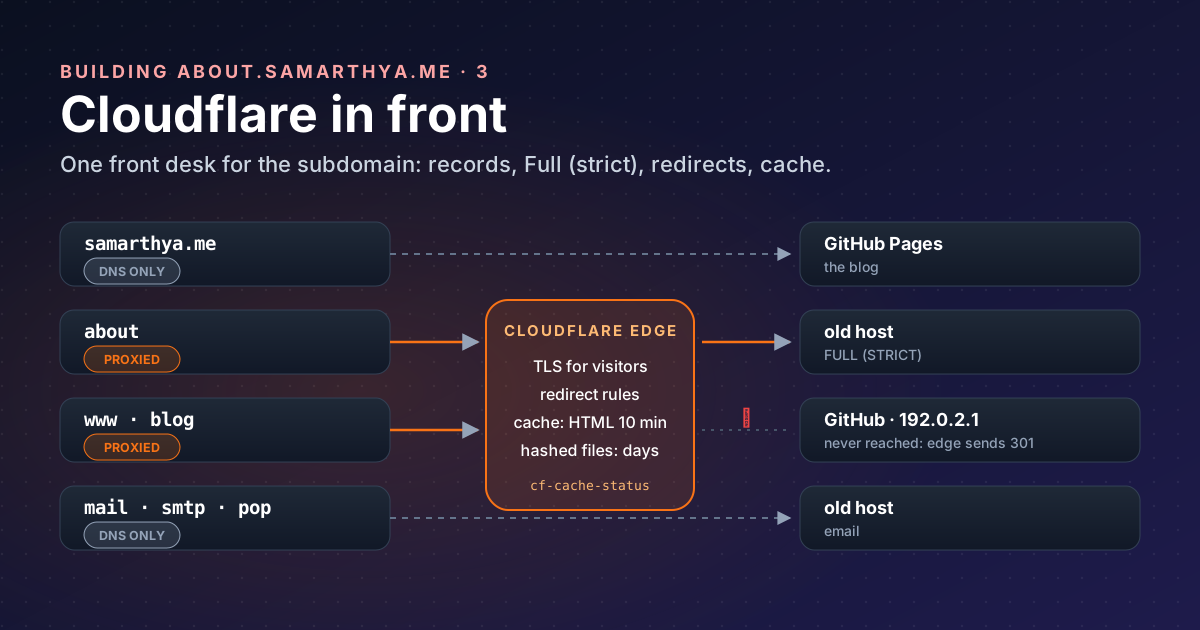
Part 1 and part 2 produced the data. Before the site can be published (part 6), it needs an address, a certificate and a sensible cache.
Words used in this post#
| Term | Meaning here |
|---|---|
| DNS record | A line in the domain’s phone book: “this name is at that address” |
| Origin | The server that actually holds the files (here, the old host) |
| Edge | Cloudflare’s servers near the visitor, which answer first |
| Proxied / DNS-only | Cloudflare’s orange and grey clouds: answer as the site, or just hand out the address |
| TLS certificate | Proof that a server really is the name in the address bar |
| ACME | The protocol Let’s Encrypt uses to issue certificates automatically |
| Cache | A stored copy, so the next visitor doesn’t need the origin |
Why this subdomain is proxied when the blog isn’t#
In Rebuilding, part 4 I left the blog itself DNS-only: GitHub Pages has its own fast network and renews its own certificate. The hub is different. Its origin is the shared host that was breached last month, which now only runs email and serves static files.
A proxied record answers with Cloudflare’s addresses instead of the origin’s, so visitors’ requests land at Cloudflare, where its TLS, caching and rules apply. For this site that means:
- One front door. Redirects, caching and, later, the like button (a Cloudflare Worker) all live at the edge, not on the host.
- TLS checked twice. Visitor to Cloudflare, and Cloudflare to the origin, both encrypted and verified.
- Less traffic at the origin. Cached files are served without touching it.
What it doesn’t do here is hide the server. Mail can’t be proxied (Cloudflare proxies only A, AAAA and CNAME records; MX and the mail host stay DNS-only), and the mail host is the same machine. Anyone curious can find the origin. The proxy is about control, not secrecy, and the origin is hardened as if it were public (part 6).
The records#
No addresses here, only their shape:
| Name | Type | Proxy | Points to | Job |
|---|---|---|---|---|
samarthya.me | A | DNS only | GitHub Pages | The blog |
www | CNAME | Proxied | GitHub Pages | Redirected to the apex by Cloudflare |
about | A | Proxied | the old host | This hub |
blog | A | Proxied | 192.0.2.1 | Old address: redirected by Cloudflare |
mail, smtp, pop | A | DNS only | the old host |
192.0.2.1 deserves a note. It’s in a block reserved for documentation
that “SHOULD NOT appear on the public Internet”. Proxying the old blog name to it means no request ever
reaches a real server: Cloudflare answers every one of them with a redirect.
www was a surprise. I thought it was DNS-only like the blog, but the dashboard showed 90,000 requests in a
week, 86,000 “served by origin”, far more than a week-old hub could explain. A quick check found www
proxied: every request went through Cloudflare to GitHub Pages, only for GitHub to answer “go to the apex”.
Two-thirds of it turned out to be Googlebot re-checking old addresses after the move (part 4). Now Cloudflare answers www itself (step 3), and GitHub is
never asked.
Step 1: a certificate at the origin that renews itself#
Cloudflare’s edge has its own certificate for visitors. The origin needs one too, or the connection between Cloudflare and the host can’t be verified.
The hosting panel issues one from Let’s Encrypt using the
HTTP-01 challenge: Let’s Encrypt asks for a token at
http://about.<domain>/.well-known/acme-challenge/<token>, and the panel puts it there. That works through
Cloudflare’s proxy, because the request simply passes through to the origin, and Let’s Encrypt follows
redirects to HTTPS on port 443 if there are any.
Two things surprised me:
- “Names skipped” is not an error. The panel tries every name it knows. Names that now point elsewhere (the blog moved to GitHub) fail the check and are left out. The certificate is still issued for the rest.
- The first certificate was the wrong one. Until provisioning re-ran with
aboutincluded, the origin answered with the host’s default certificate, issued for the provider’s own server name. Visitors saw nothing wrong yet, because the SSL mode wasn’t strict. That’s exactly the gap the next step closes.
I chose HTTP-01 over DNS-01 on purpose. DNS-01 needs a DNS API token on the server, and Let’s Encrypt itself warns that “putting your full DNS API credentials on your web server significantly increases the impact if that web server is hacked”. On a host that was hacked, that’s a no.
Check what the origin really serves, bypassing Cloudflare (replace the placeholders):
openssl s_client -connect ORIGIN_IP:443 -servername about.example.com </dev/null 2>/dev/null \
  | openssl x509 -noout -subject -ext subjectAltName -enddate
The subjectAltName line must list about.example.com.
Step 2: SSL mode Full (strict)#
Cloudflare’s encryption modes decide how it talks to the origin:
| Mode | Cloudflare → origin |
|---|---|
| Off | No encryption at all |
| Flexible | Plain HTTP; only the visitor’s half is encrypted |
| Full | HTTPS, but the origin’s certificate isn’t checked |
| Full (strict) | HTTPS, and the certificate must be valid for the name |
Cloudflare “strongly recommends using Full or Full (strict) modes”. Flexible looks secure in the browser while the second half travels in the clear. Full encrypts but would happily accept the wrong certificate from step 1. Full (strict) turns that mistake into a visible error, which is what you want. Set it under SSL/TLS → Overview, after step 1 shows the right name.
The catch: with strict mode, an expired origin certificate means the site is down. The panel renews automatically; I’ve noted the renewal date anyway.
Step 3: redirect rules for the old address#
Six years of links point at blog.samarthya.me/wps/.... Before the move, the old host answered them with
a page that said “301 Moved” but returned HTTP 200, which search engines treat as a real page. So the
redirect moved to Cloudflare, under Rules → Redirect Rules
(Single Redirects; the free plan
allows 10):
| Order | When | Then |
|---|---|---|
| 1 | http.host eq "blog.samarthya.me" and http.request.uri.path in {"/feed" "/feed/" "/wps/feed/"} | Static: https://samarthya.me/index.xml, 301 |
| 2 | Hostname equals blog.samarthya.me | Dynamic: concat("https://samarthya.me", http.request.uri.path), 301, preserve query string |
| 3 | Hostname equals www.samarthya.me | The same dynamic redirect, 301, preserve query string |
The www rule replaced a round trip to GitHub. Before it, the response came from GitHub through Cloudflare
(cf-cache-status: DYNAMIC); now it comes straight from the edge, and GitHub’s certificate for www no
longer matters.
Three details matter:
- Order. The feed rule must sit above the general one, or old feed readers get sent to a page that doesn’t exist. The end-to-end test caught the missing feed, not me.
- Preserve query string is off by default.
Turn it on for the general rule (old
?p=123links need it), and leave it off for the feed rule, which always goes to one fixed address. - 301 means permanent: browsers and search engines remember it and update their links.
curl -sI "https://blog.example.com/wps/some/post/?a=1" | grep -i "^HTTP\|^location"
# HTTP/1.1 301 Moved Permanently
# Location: https://example.com/wps/some/post/?a=1
Step 4: what gets cached#
By default, “the Cloudflare CDN does not cache HTML or JSON”; it caches files by extension: CSS, JS, images, fonts. You can see it in the headers:
curl -sI https://about.example.com/ | grep -i "cf-cache-status\|cache-control"
# cache-control: max-age=600
# cf-cache-status: DYNAMIC
DYNAMIC means Cloudflare
“determined at request time that the asset is not eligible for cache”: every page view goes to the origin.
For a site that only changes when I publish, that’s wasted trips to a server I’d rather keep quiet. So I added one Cache Rule (the free plan has 10):
| Setting | Value | Why |
|---|---|---|
| When | Hostname equals about.samarthya.me | This site only |
| Cache eligibility | Eligible for cache | Include HTML |
| Edge TTL | Use cache-control header if present | The origin already says how long (settings) |
| Browser TTL | Respect origin | Same |
Right after creating it, the first request showed MISS and the next ones HIT, with max-age=600 intact.
The origin’s .htaccess sets the lifetimes: 10 minutes for HTML, 7 days for CSS and scripts, 30 days for
images. Long lifetimes are only safe for files whose name changes when the content does: Quarto names its
stylesheet bootstrap-<hash>.min.css, and the page loads live.js?v=<hash>. A new publish produces new
names, so nobody gets yesterday’s stylesheet with today’s page.
That design also means I don’t need to purge the cache after each publish. HTML expires within ten minutes on its own, and Cloudflare warns that a full purge means “every subsequent request must be served from your origin until the cache is repopulated”.
Cache and freshness#
Caching makes a static page more static. That’s why the home page doesn’t depend on the cache for news:
the Recent tiles are refreshed in the visitor’s browser from the blog’s own latest.json, every load. The
cache holds the frame; the posts come live. Part 6 has the details.
Checking it from the outside#
| Check | Expect |
|---|---|
curl -sI https://about.example.com/ | server: cloudflare, 200 |
openssl s_client to the origin (step 1) | the about name in subjectAltName |
curl -sI https://blog.example.com/wps/x/?a=1 | 301 to the same path and query on the apex |
curl -sI https://blog.example.com/feed/ | 301 to /index.xml |
curl -sI https://about.example.com/ twice | MISS the first time, then cf-cache-status: HIT |
Takeaways#
- Proxy a subdomain when you want one front door for TLS, rules and caching; don’t expect it to hide an origin that also runs mail.
- Get the origin certificate right first, then switch to Full (strict), so a wrong certificate becomes an error instead of a silent gap.
- Prefer HTTP-01 on a server you don’t fully trust: DNS-01 would put DNS credentials on it.
- Redirect at the edge with a real 301, keep query strings where old links use them, and mind the rule order.
- Cache HTML briefly, cache hashed files for long, and you rarely need to purge.
References#
- Proxy status: Cloudflare, proxied vs DNS-only and which records can be proxied
- Encryption modes: Cloudflare, Off to Full (strict)
- Challenge types: Let’s Encrypt, HTTP-01 and DNS-01
- Single Redirects, settings and availability: Cloudflare
- Default cache behaviour and cache responses: Cloudflare
- Cache Rules and their settings: Cloudflare
- Purge everything: Cloudflare
- RFC 5737: IPv4 address blocks reserved for documentation: IETF
Next: part 4, how Cloudflare tells people from bots.